How to create guided Learning Paths in Confluence?

Whether you’re managing employee onboarding, compliance training, or professional development, learners need structure and guidance.
That’s why we’re excited to introduce Learning Paths, a powerful new feature in Smart Courses for Confluence that helps organizations design structured learning journeys directly inside their Confluence LMS.
With Learning Paths, training administrators can guide learners step by step, improve training effectiveness, and significantly increase employee training completion rates.
TL; DR
Learning Paths in Smart Courses for Confluence turn scattered courses and exams into clear, guided learning journeys.
By grouping up to 10 courses or exams into a structured path, teams can improve onboarding, compliance, and employee development directly inside Confluence. With flexible sequencing, progress tracking, certificates, and insights, Learning Paths help organizations increase engagement, boost completion rates, and continuously optimize training based on real learner data.
What are Learning Paths in Smart Courses for Confluence?
Learning Paths let you group up to 10 courses or exams into a single, cohesive learning journey.
You can mix training courses and exams in any order or even build a path made entirely of exams. Instead of learners choosing what to take next, you define the sequence to ensure the right knowledge is delivered.
Each Learning Path is created within a specific Confluence space and follows that space’s permissions, making it ideal for new hire onboarding and department-specific training programs.
Key benefits include:
- Structured Learning Paths with clear course sequencing
- Centralized training content inside Confluence
- Improved learner engagement and progress tracking
- Higher training completion and accountability
Why Learning Paths matter for onboarding, compliance, and employee development
Disconnected courses often lead to confusion, low engagement, and incomplete training. Learning Paths solve this by turning individual courses into guided learning journeys.
Perfect for common training use cases:
- New hire onboarding programs
- Workplace compliance training
- Employee development and upskilling
- Corporate training and L&D initiatives
By combining self-paced learning with structured progression, organizations can create more effective learning and development (L&D) experiences.
A closer look at the Learning Path editor
Learning Path editor
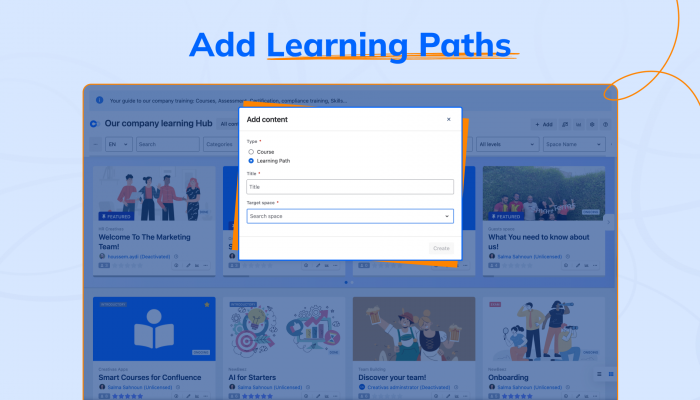
The Learning Path editor is where paths come to life. After naming your path and selecting a Confluence space, you can add up to ten courses. Courses can be reordered with drag-and-drop, added or removed at any time, and visually enhanced with thumbnails to clearly communicate the learning flow.


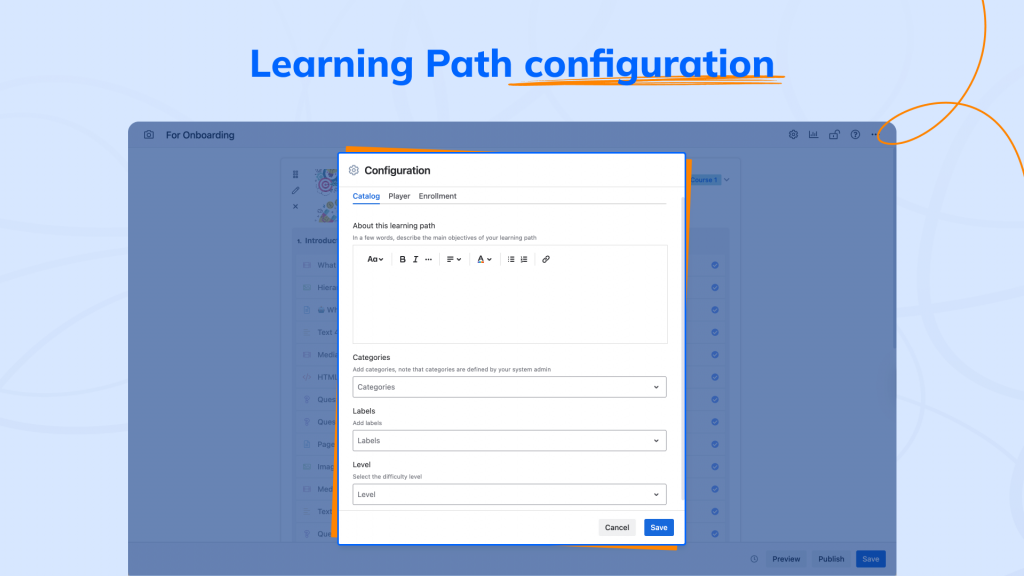
Learning Path configuration
Configuration settings let you control how Learning Paths are maintained over time. You can manage contributors, add linear progression, define a short description, and set categories, labels, and difficulty level.
These controls ensure Learning Paths remain easy to manage, scalable, and aligned with your training goals.
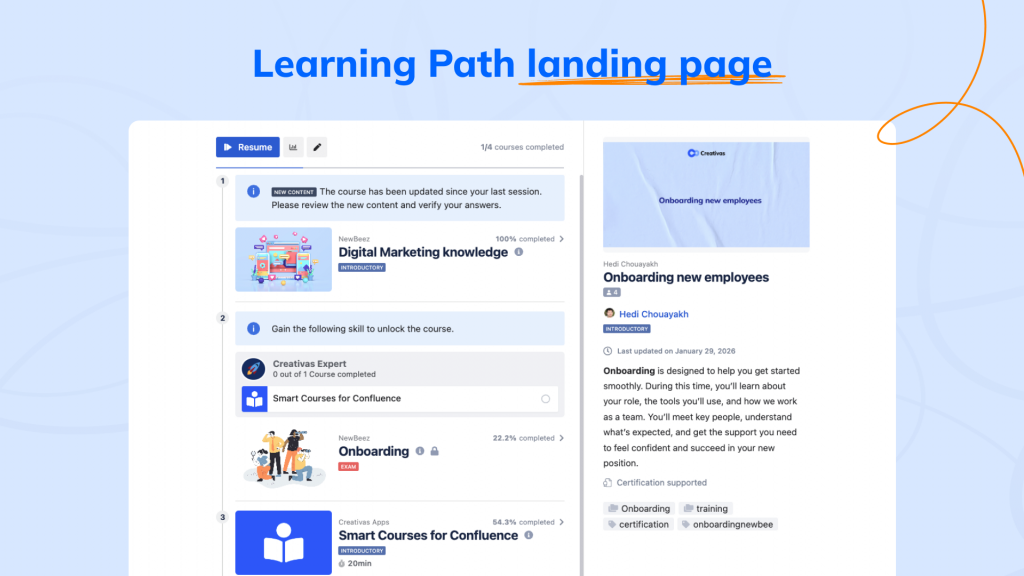
Learning Path landing page
The Learning Path landing page brings multiple courses together into one guided experience. Learners see the full journey up front, including the order, overall progress, completion status, a brief description of the Learning Path’s difficulty level, and lables.
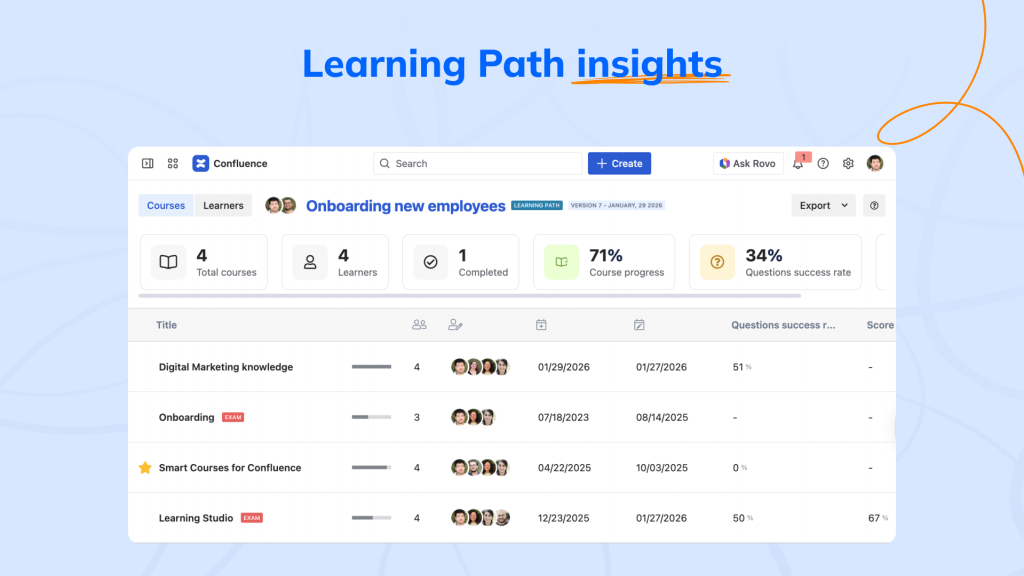
Learning Path insights
Learning Path insights focus on how learners progress through the path as a whole. Instead of reviewing individual course performance, you get a consolidated view of enrollment and completion across the entire journey either by courses or by learners.
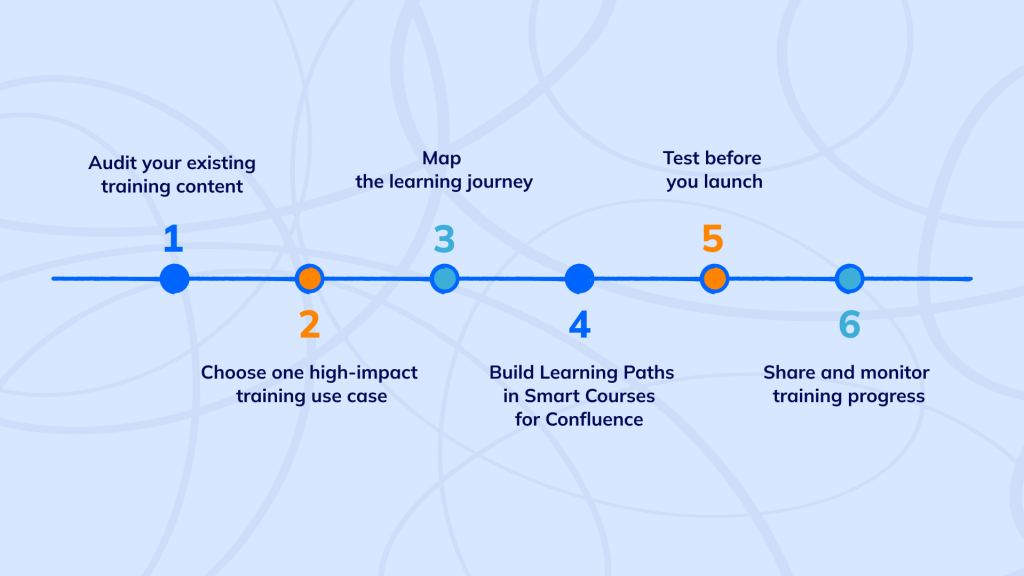
How to get started with Learning Paths and courses in Smart Courses
Ready to transform your employee training from scattered content into a structured learning experience? Here’s how to get started with Learning Paths and Courses in Smart Courses for Confluence.
Step 1: Audit your existing training content
Start by reviewing all your employee training courses already stored in Confluence. Identify:
- Which content works best as standalone courses
- Which courses naturally belong together in a learning path
Ask key questions:
- What should new hires learn first in their onboarding experience?
- Which courses act as prerequisites for advanced training?
This audit lays the foundation for learning paths and effective course sequencing.
Step 2: Choose one high-impact training use case
Don’t try to structure everything at once in your Confluence LMS. Start with one critical use case, such as:
- New hire onboarding
- Compliance training
- Core role-based employee training
Decide whether you need:
- A Learning Path (up to 10 courses) for a guided learning journey, or
- A single, well-structured course for focused training
Launch small, validate the approach, then scale across your training programs.
Step 3: Map the learning journey
Before building in Smart Courses, outline the learning experience:
- What is the first concept a learner needs to understand?
- Which course or module comes next?
- Are there clear course prerequisites?
- What does “completion” look like?
This planning step applies to both learning paths and individual courses, making the build process faster and more intentional.
Step 4: Build Learning Paths in Smart Courses for Confluence
Create a Learning Path in Smart Courses:
- Add up to 10 courses to a Learning Path
- Arrange courses using drag-and-drop sequencing
- Add descriptions, labels, and categories for discoverability
Once built, preview the experience to ensure clarity and flow.
Step 5: Test before you launch
Invite 2–3 learners to complete the course or Learning Path. Gather feedback on:
- Course order and pacing
- Clarity of instructions and descriptions
- Overall learning experience
Refine your content based on real learner input, especially for onboarding and compliance training.
Step 6: Share and monitor training progress
Publish your course or Learning Path and assign it to the target audience. Use the training insights dashboard to track:
- Course and Learning Path completion rates
- Progress through the learning journey
- Drop-off points in structured Learning Paths
Use these insights to continuously improve training effectiveness.
Pro tips from our Smart Courses team
Start with solid foundations: Create clear, well-scoped courses and exams, then organize them into Learning Paths that guide learners toward a specific goal.
Design with purpose, not overload: Each Learning Path can include up to 10 courses. You can mix training courses and exams in any order, or build a path entirely of exams. making it ideal for onboarding programs, compliance training, and employee development, structured but never overwhelming.
Combine guided journeys with standalone learning: Use Learning Paths alongside individual courses to give learners both direction and flexibility.
Balance short, focused modules with more in-depth training to keep learners engaged while still delivering meaningful knowledge.
Explain the value of every step: Make it clear why each course exists and how it contributes to the overall learning journey.
Motivate progress with recognition: Certificates and completion milestones help learners stay engaged and feel rewarded along the way.
Refine with data over time: Once your paths are live, use analytics to review performance, spot drop-offs, and continuously optimize course sequencing and structure.
ConfluenceLearningOnboarding