How to customize a training catalog in Confluence

Most organizations don’t struggle to create training content; they struggle to deliver it in a structured, scalable, and engaging way.
In Confluence, training materials often end up scattered across pages, inconsistently formatted, and difficult to navigate. As content grows, users lose visibility, and administrators lose control over structure and consistency.
Smart Courses for Confluence solves this by turning Confluence into a structured training system where teams can build a fully customized learning catalog, define clear Learning Paths, and control how content is discovered, filtered, and consumed.
TL; DR
Most training content fails due to a lack of structure, not quality. In Confluence, content is often scattered and hard to navigate, making it difficult for teams to learn effectively.
Smart Courses for Confluence transforms this into a structured Confluence training platform by organizing content into courses, exams, and Learning Paths that Confluence users and learners can follow.
With a customizable training catalog, Confluence teams can filter by category, difficulty, language, and status, making training easy to discover and scale.
Complementary tools like Rovo AI, Refined sites, Scroll Documents, Aura, Composition Tabs, and the Synced Block Macro enhance search, structure, and usability across the Confluence environment.
Building a structured training system
The main shift Smart Courses introduces is moving from unstructured documentation to a designed learning environment.
Instead of isolated pages, training content is organized into structured learning elements, including courses, exams, Learning Paths, and a centralized catalog. This allows organizations to design training intentionally, ensuring consistency across teams while maintaining flexibility to accommodate different learning needs.
As a result, training becomes easier to manage, easier to scale, and significantly easier for users to follow, since content is no longer fragmented but part of a clear learning journey.

Building a customized training catalog
One of the most important aspects of delivering a strong training experience is customization.
Smart Courses allows teams to customize its catalog views based on their specific needs. The catalog can be adapted to reflect internal structures, training priorities, and audience segmentation.
This flexibility is essential when thinking about how to build a learning system in Confluence that scales across teams and departments.
Filters
Discoverability is where most training systems fail and where Smart Courses delivers the most impact.
The catalog includes a powerful filtering system that allows learners to find content quickly based on:
- Type (courses, exams, Learning Paths)
- Category
- Difficulty
- Language
- Status (assigned, ongoing, done, and favorites)

These filters transform the catalog into a dynamic discovery tool. Instead of searching manually, learners can navigate training logically and efficiently.
This directly addresses the core issue: making training content not just available, but easy to find.
Beyond structure: customizing the training experience
Customization in Smart Courses for Confluence goes beyond organizing content; it defines how training is experienced.
Teams can brand the catalog with logos and titles, and add announcement messages (info, note, or warning) to guide users directly within the interface. This transforms the catalog from a simple page into a dedicated training environment.
Administrators can also control how content is prioritized by setting default sorting and featuring up to 20 courses, ensuring the most important training is immediately visible.
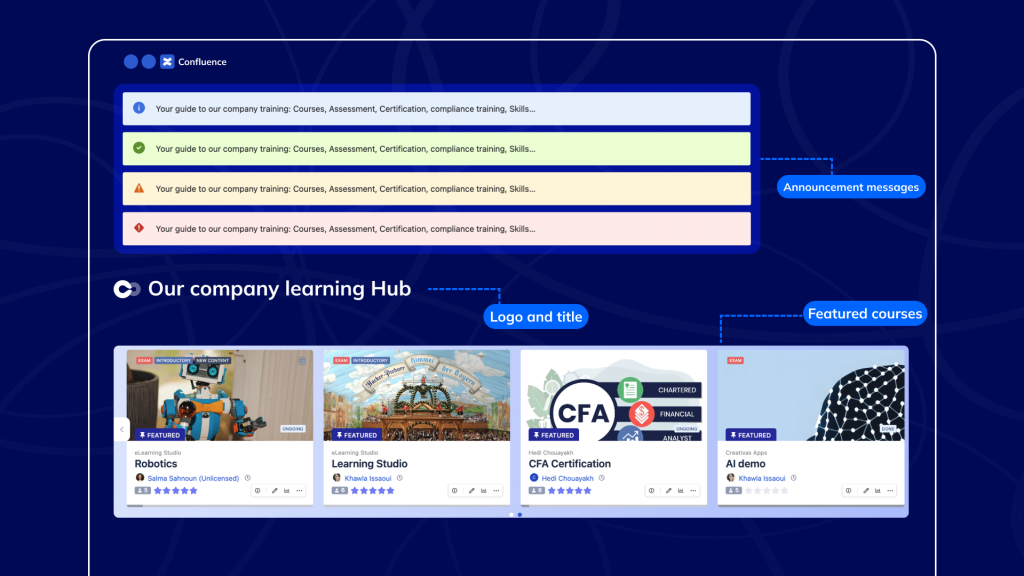
On the visual side, course cards can be customized to show or hide specific information, while layout settings such as thumbnail size and scaling keep the catalog clean and consistent.
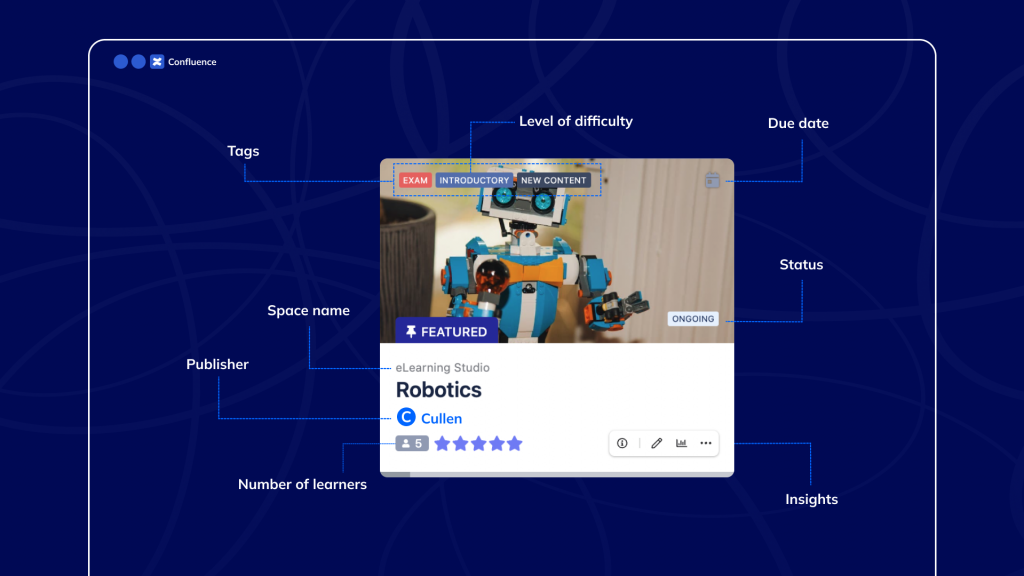
At the same time, categories and difficulty levels bring structure to the experience. Categories can be created without limitation, allowing teams to organize content by topic, department, or training objective. Difficulty levels, defined up to ten levels, introduce a clear sense of progression by indicating course complexity.
Together, these capabilities turn the catalog into a structured, branded, and fully controlled training experience, not just a list of content.
Improving discovery, structure, and learning experience with ecosystem tools
Beyond Smart Courses itself, the training experience becomes more powerful when supported by complementary tools that enhance the Confluence environment.
Rovo AI by Atlassian improves content discovery by helping users surface relevant training materials and documentation through intelligent search and contextual recommendations across Confluence and connected apps. Instead of relying solely on manual navigation, users can ask natural queries and quickly find useful knowledge across their organization.
Refined sites by Refined transforms Confluence into a fully branded training portal by improving navigation, layout, and overall user experience. This creates an environment that feels like a purpose-built training platform rather than a traditional documentation space, which increases engagement and usability.
On the content-structure side, scroll content manager by K15t helps teams manage training documentation in a scalable, consistent way. It ensures that content remains properly structured, version-controlled, and easy to maintain as training programs evolve.
To reinforce consistency, Synced Blocks Macro for Confluence allows teams to reuse content across multiple training pages while keeping it synchronized.
For presentation and usability, Aura Content Formatting Aura Apps (Seibert – appanvil) improves the visual structure of training content by introducing layout components that enhance readability and reduce cognitive load, making learning materials easier to consume.
Finally, Composition Tabs by Appfire for Confluence helps organize complex content into structured sections using tabs, allowing learners to navigate information more easily without being overwhelmed.
Together, these tools enhance the broader Confluence environment in which Smart Courses operates, improving discovery, structure, consistency, and usability around the training experience.
ConfluenceLearningOnboarding