SQL Views for Confluence Tables | Creativas

 You don’t need to know SQL to use SQL.

Ask your data a question in plain language.
Smart Tables’ AI mode writes the query, runs it, and gives you the answer.

SOC 2 Type II
Forge developed
Runs on Atlassian
900 Happy customers

When your questions get complex, filters aren’t always enough

Complex reporting 

Questions about project status, budgets, risks, or progress often require several filters, formulas, or separate reports. 
The data is already in Confluence, but getting the exact view you need can take time.

SQL knowledge as a barrier

SQL can answer more complex questions, but not everyone knows how to write it.
That often leaves teams dependent on technical users for queries they should be able to answer themselves.

One question, another report

“Which projects are over budget?” or “What high-priority tasks are overdue?” shouldn’t require rebuilding a report every time. 
Teams need a faster way to query the same data for different questions.

How it works?

From question to answer in seconds

Go beyond simple filters with SQL queries that answer complex questions across your data.

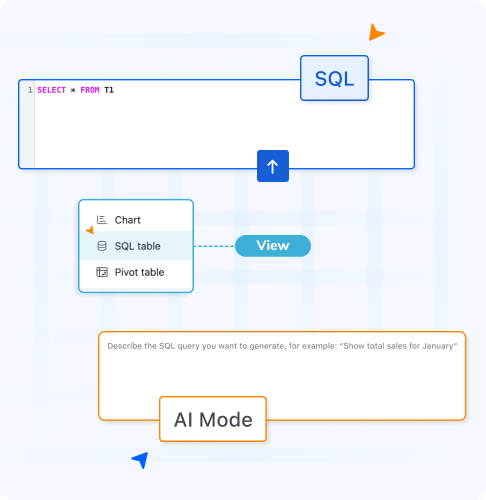
Use AI Mode to describe your request in plain language and automatically generate the SQL query.

Every query creates its own SQL View. Your original Smart Table remains untouched.

Create reports once, save them, and run them again whenever your data changes.

Combine multiple conditions, sort, filter, group, and summarize data in a single query.

SQL Views work directly inside Smart Tables with no external databases or integrations required.

Get Smart Courses full demo!

We’ll never share your email address

Who it’s for

Built for every team that lives in Confluence

Smart Tables helps teams get more value from the data they already manage in Confluence. Instead of exporting tables, creating separate reports, or combining several filters manually, teams can use SQL to answer more specific questions directly from their Smart Tables.

  • Project teams: Identify overdue work, high-risk projects, blocked tasks, priorities, owners, and progress across large project tables.
  • Finance teams: Compare budgets with actual spending, find cost variances, filter by department, and create focused views for recurring reviews.
  • Operations teams: Analyze workloads, resources, statuses, deadlines, and other operational data without rebuilding the same report every time.
  • Leadership teams: Turn detailed tables into clearer views that surface the information needed for portfolio reviews, planning, and decision-making.
  • HR and people teams: Query onboarding trackers, training records, employee data, or internal processes using multiple conditions at once.
  • Any Confluence user: Ask a question in plain language with AI mode, making advanced table analysis accessible even without SQL experience.

Stop waiting on someone else to run the query

Ask your questions, Get your answers, Live! 

Arrow-up