How to turn monday.com into an LMS? Yes, it’s possible.

With Smart Courses LMS for monday.com, you can transform your existing workspace into a complete training and exam platform, without adopting a separate system, managing multiple logins, or paying for an entirely independent LMS.
If your team already runs projects, onboarding, HR workflows, and daily operations inside monday.com, chances are you’ve already wondered:
“Can we also train our teams here?”
“Can it function as our LMS?”
Short answer: Yes. And it works even better than you think.
This article explains how monday.com’s structure naturally supports learning, how Smart Courses uses that same architecture to enable training, quizzes, and analytics, and why integrated learning often outperforms a standalone LMS.
1. Is monday.com naturally designed for learning?
Even though monday.com is widely known as a work management platform, its fundamental building blocks mirror the elements you would expect to find in a modern LMS. Boards, for example, are essentially structured databases, the perfect place to organize courses, store training categories, or manage compliance requirements. Items, which normally represent tasks or projects, can easily represent training modules, lessons, assessments, or learning paths.
monday.com also gives teams a flexible visual environment.
Views allow you to present information in various formats, which is incredibly useful for displaying training dashboards or course libraries. The platform’s built-in permissions and automation capabilities also behave much like those in a traditional LMS. You can control who can access what, automatically assign training when someone joins a team and more.
All of these components, structured content, configurable views, workflow automation, and strong reporting, are the exact foundations an LMS requires. Smart Courses builds on that familiar architecture to add the missing layer: the training experience itself.
2. How Smart Courses builds a complete LMS for monday.com right inside your workspace?
What makes Smart Courses LMS truly powerful is how effortlessly it blends into monday.com. Instead of introducing a new interface or external dashboards, the app uses the same visual patterns, the same navigation style and the same workspace flow users are already comfortable with.
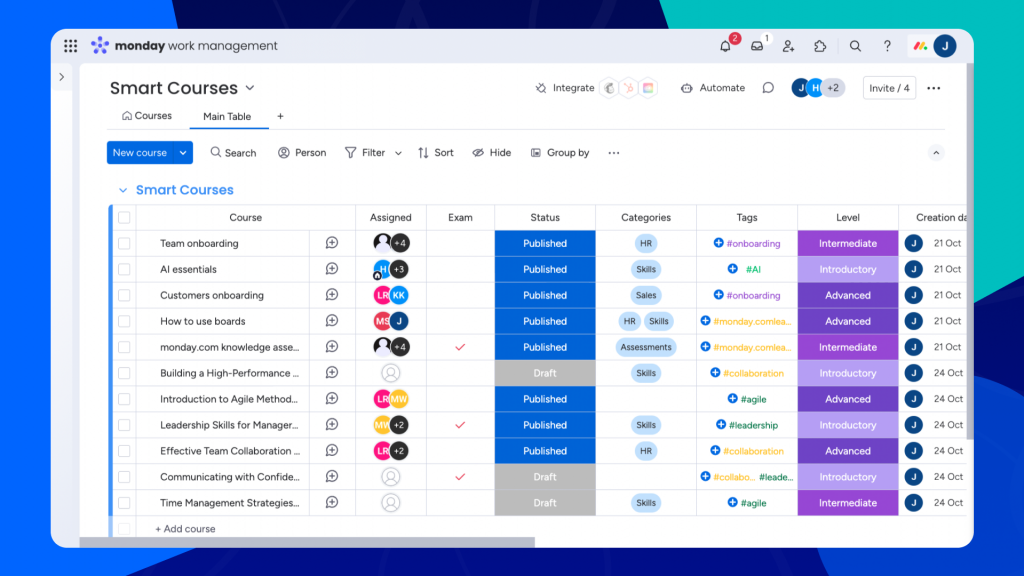
This creates a learning environment that feels natural rather than foreign.
Course creation follows the same intuitive logic as building anything else on monday.com. You can assemble training programs by combining videos, PDFs, audio files, questions, and interactive elements.
This content can be grouped or sequenced into sections, allowing you to design structured learning experiences without dealing with the complexity of traditional LMS builders. Everything appears inside the item view, which becomes a dedicated training screen customized for each course.
Smart Courses LMS for monday.com also adds full assessment functionality. Exams can include questions such as multiple-choice, ordering, and essays… Since everything runs on monday.com, learners don’t need to open external tools. Their progress, attempts, scores, and completion dates are recorded directly in the workspace, turning your boards into a live learning database.

Because the app is built natively on monday.com, reporting becomes exceptionally easy. Managers can track performance without leaving their monday.com, filtering results by user, reviewing completion rates, or analyzing quiz performance in real time. The data is always available and always up-to-date.
3. Why does an integrated LMS for monday.com outperform a standalone one?
Standalone LMS platforms often struggle with adoption, not because they lack features, but because they exist outside the daily workflow.
Asking employees to log into another system, with another interface, another set of notifications, and another learning curve, inevitably creates friction. Completion rates drop, engagement weakens, and training becomes something people do in addition to their work, rather than as part of it.
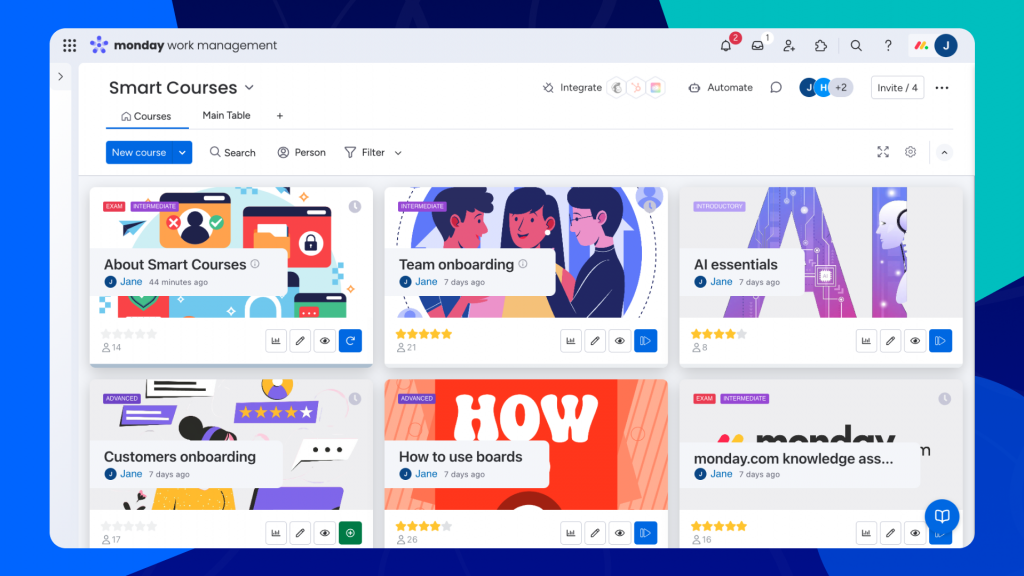
By keeping training inside monday.com, Smart Courses eliminates this friction. Employees already spend their day on the platform; their tasks, communication, and goals already live there. When training appears in the same space, it becomes an organic part of their routine. This significantly improves completion and reduces the mental overhead of switching tools.
Integrated learning also means integrated workflows. With Smart Courses, training becomes part of the full lifecycle of work: when an employee joins, they automatically receive their onboarding courses; when a user joins a new team, new training appears; when a compliance cycle resets, reminders fire automatically.
You also avoid the complexity of maintaining multiple systems. Instead of having an LMS for learning, monday.com for projects, and separate reporting tools, Smart Courses consolidates everything in one place. The result is a simpler, more coherent, and more cost-efficient environment that scales with your team.
In essence, Smart Courses makes not just a platform for managing training, but a platform for growing people, and it does so with the same clarity, structure, and simplicity that users already love.
ComplianceLearningOnboardingperformance trackingTraining