Smart Courses for Confluence new release: January 2026

Confluence is where your teams collaborate, document knowledge, and share content. To add structured training and compliance management, Smart Courses for Confluence turns your wiki into a full-featured LMS. The app lets you build courses, quizzes, and certifications directly inside Confluence.
In the latest release, we’ve significantly enhanced the Course Insights dashboard, making learner progress and course versions crystal-clear. Training admins can now instantly see if a learner session is based on an outdated course version, and reports can be broken down by version. These improvements deliver reliable, version-specific analytics that are essential for compliance audits and continuous training.
Enhanced course insights & version tracking
We’ve enhanced the Course Insights section to make tracking learner data clearer and version-specific.
- When a new major course version is published, existing learner sessions from older versions are automatically deprecated.
- Each course title now shows the latest version and when the course was last saved.
- Next to each learner’s name, an icon now shows if their session was completed on an outdated course version. By hovering over the icon, you can see which version they took. Learners can reopen the course player to access the latest version and automatically update their session.
- When data is exported to Excel, each course version with submitted answers to questions will now appear on a separate sheet, giving you clearer version-based reporting.
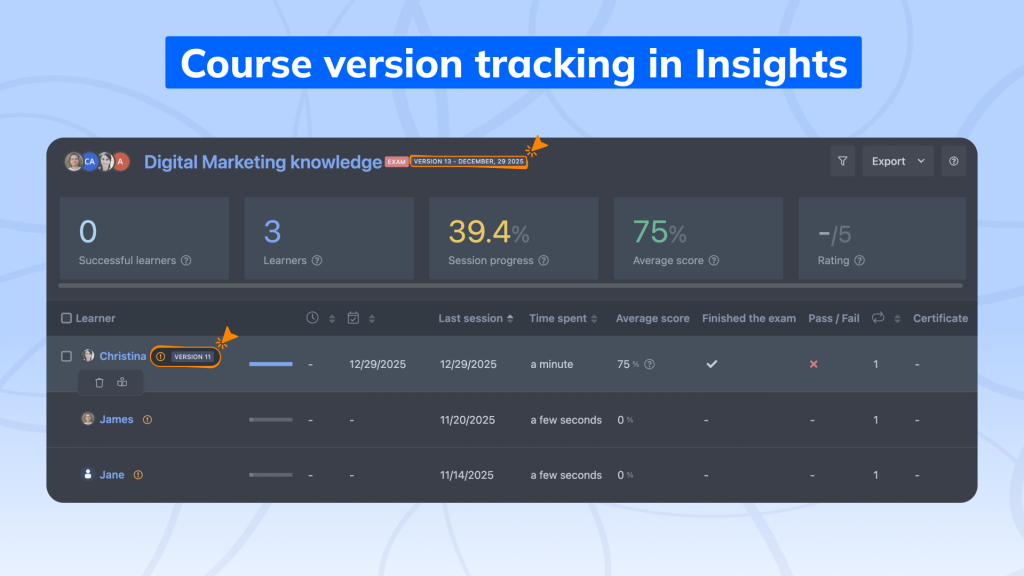
These changes make Insights more reliable, especially for compliance, audits, and tracking ongoing training performance.
Major versions: What counts as a significant update
Not every edit creates a new major version. Smart Courses automatically creates a new major version only when substantial changes are made to the default-language content, such as:
- Content edits: Adding, removing, or editing course sections or components in default language.
- Reordering: Changing the order of sections or components.
- Exam parameters: Updating the minimum pass score.
- New SCORM package: Uploading a new SCORM file.
- Version restore: Rolling back to a previous version of the course.
Minor edits, such as translations or minor course settings changes, do not trigger a new major version.
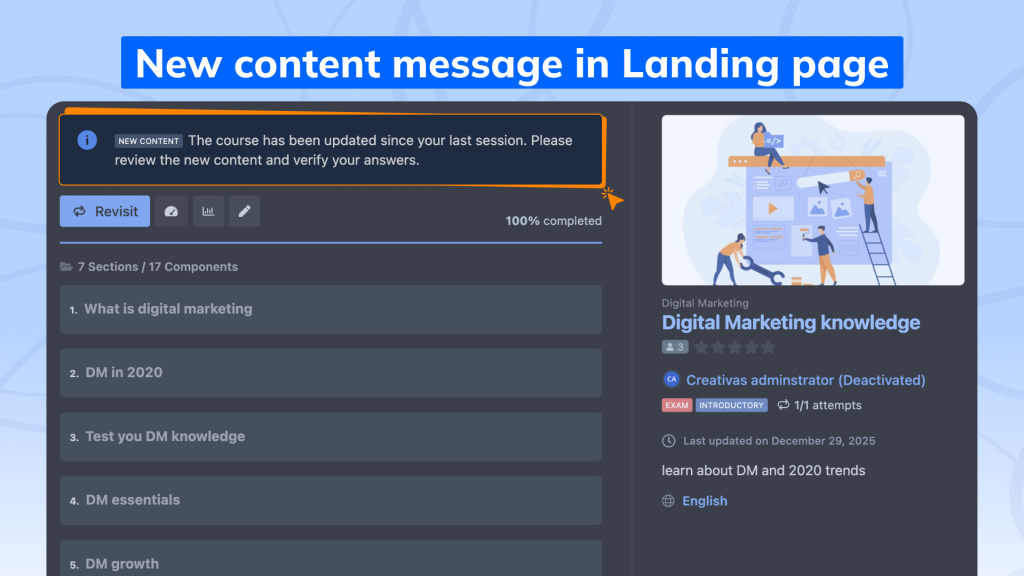
When a major update is published, the course card and landing page display a “New Content” tag to notify learners.
Course editing rules & Session protection
To preserve the accuracy of learner data across versions, Smart Courses enforces several editing safeguards once learners are enrolled:
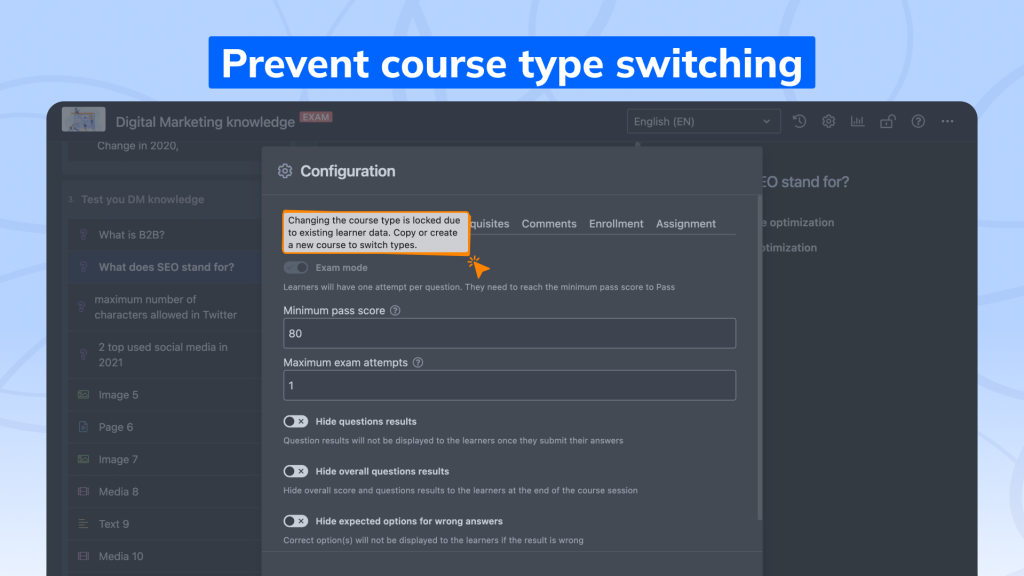
- Course type locked: You can’t switch between “exam” and “regular” course types after learner sessions exist. This ensures consistent reporting in Insights.
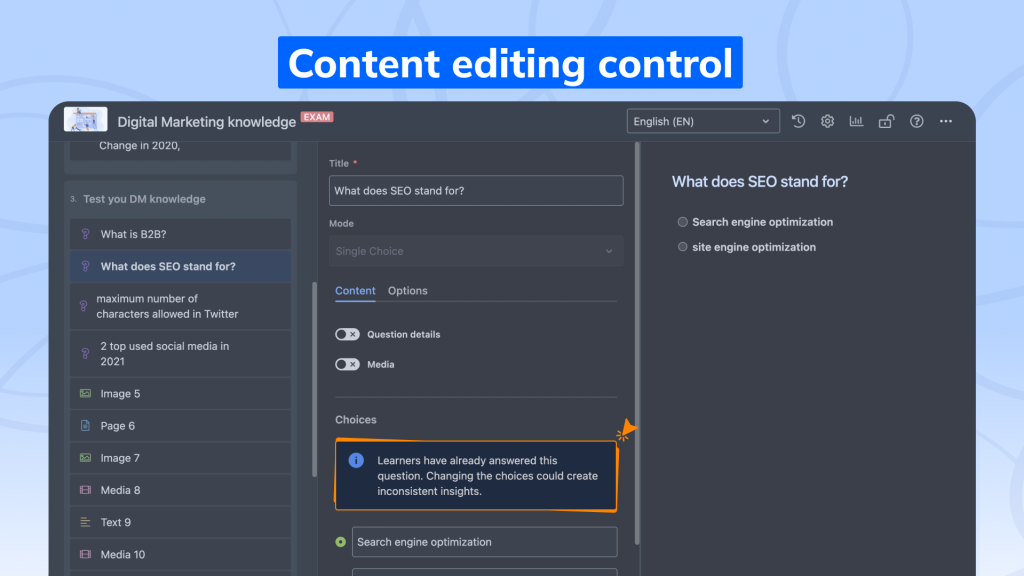
- Quiz integrity: When editing quiz questions that already have learner responses, changing the answer choices may impact existing data.
A warning message will appear before saving, reminding you to be cautious before making these changes.
- Certificate protection: If at least one learner has earned a certificate, the certificate feature cannot be disabled in the course editor.
However, the “Only when pass” setting can still be modified.
These safeguards ensure historical results remain intact and reporting stays consistent over time. You maintain a clear audit trail, with edits that could affect past results either restricted or clearly controlled.
Learner view: Update notifications & certificates
Learners will now see a new information panel on the course landing page whenever a new major version of the course is published.
This helps them know when updates are available and ensures they always learn from the most recent version.
Importantly, when a learner completes a course and earns a certificate, that certificate remains linked to the version they completed.
Any new major version published afterward won’t affect their earned certificate or progress.
Why This Matters
These updates give teams better visibility into training activity across evolving course content.
You can clearly see:
- Which version did each learner complete?
- When and how the course content changed
- How updates affect completion rates and results over time
With session deprecation and enhanced version visibility, Smart Courses for Confluence makes learning data more transparent, accurate, and actionable. You can confidently track, manage, and trust your team’s training history even as courses grow and evolve.
ConfluenceLearningOnboarding