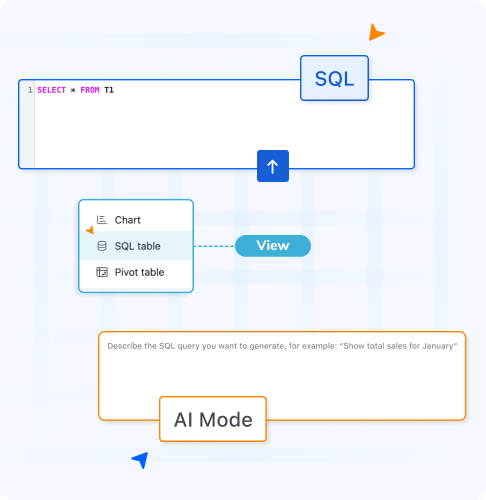
You don’t need to know SQL to use SQL.
Ask your data a question in plain language.
Smart Tables’ AI mode writes the query, runs it, and gives you the answer.

Questions about project status, budgets, risks, or progress often require several filters, formulas, or separate reports.
The data is already in Confluence, but getting the exact view you need can take time.
SQL can answer more complex questions, but not everyone knows how to write it.
That often leaves teams dependent on technical users for queries they should be able to answer themselves.
How it works?
Go beyond simple filters with SQL queries that answer complex questions across your data.
Use AI Mode to describe your request in plain language and automatically generate the SQL query.
Every query creates its own SQL View. Your original Smart Table remains untouched.
Create reports once, save them, and run them again whenever your data changes.
Combine multiple conditions, sort, filter, group, and summarize data in a single query.
SQL Views work directly inside Smart Tables with no external databases or integrations required.

Who it’s for
Smart Tables helps teams get more value from the data they already manage in Confluence. Instead of exporting tables, creating separate reports, or combining several filters manually, teams can use SQL to answer more specific questions directly from their Smart Tables.
Ask your questions, Get your answers, Live!
![]()
![]()
![]()
![]()
Thanks for fast support and new functions in your product. I will use this plugin in my work. Recomend.
![]()
![]()
![]()
![]()
Simply added basic functionality that solves 99% of the daily needs.
![]()
![]()
![]()
![]()
A very useful app. However the high rating is primarily for the excellent support by Creativas. Highly recommend!