How Atlassian AI definitions explain terms and what makes Lexi, Smart Terms Glossary AI Assistant, different!

With features like Atlassian AI definitions powered by ROVO, employees can select an unfamiliar term, ask for an explanation, and get an answer instantly. Some acronyms are even defined and highlighted automatically, so you don’t always have to look it up. It is fast, convenient, and often surprisingly accurate.
So if AI can explain terms on demand, do organizations still need a glossary?
The short answer is yes.
Because explaining a term and managing organizational terminology are two completely different challenges.
AI helps people understand information in the moment. A glossary ensures everyone across the organization is working with the same definition, the same language, and the same source of truth.
The most effective knowledge management strategy is not choosing between AI and a glossary. It is understanding where each one delivers value.
Where do AI definitions shine?
Imagine a new employee reading a technical document for the first time.
They encounter a term they have never seen before. Instead of opening another tab, searching through documentation, or messaging a colleague, they can simply define that word from a Confluence page using Atlassian AI definitions.
This is where this feature excels.
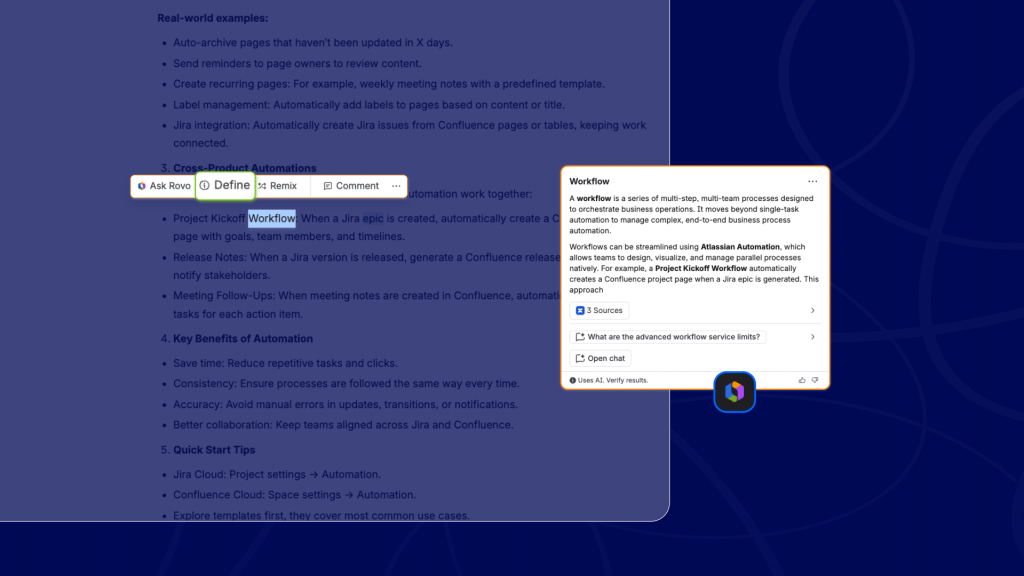
AI-generated definitions are contextual. They can analyze surrounding content, interpret intent, and provide explanations tailored to the situation. They require little maintenance and can scale across large amounts of information automatically.
For quick clarification, AI is often the fastest solution.
When the question is: “What does this mean right now?” AI is usually the right answer.
Where does AI reach its limits?
The challenge begins when terminology becomes specialized, or when the same word means something different depending on who you ask.
Consider terms like:
- RAID log (Risks, Assumptions, Issues, Dependencies), a staple for any PMO, rarely explained the same way twice
- WSJF (Weighted Shortest Job First), core to SAFe prioritization, and genuinely hard to look up in plain language
- Product Owner, a title that exists natively in Jira, yet means something different on nearly every team that uses it
- CAB (Change Advisory Board), meaningless as three letters unless your org has already defined it
- DORA metrics: deployment frequency, lead time, MTTR, change failure rate, often tracked differently team to team
- RTO / RPO (Recovery Time Objective / Recovery Point Objective), high-stakes compliance terms that are easy to mix up
- Definition of Done (DoD), famously interpreted differently by nearly every Agile team
These aren’t just vocabulary. They’re business-critical concepts, and in several cases, the inconsistency itself is the problem, not just the definition.
Different teams may interpret them differently. Different departments may create competing definitions. Over time, documentation becomes inconsistent, and onboarding becomes harder.
AI can explain these terms, but it cannot guarantee that every employee receives the exact same official definition every time.
AI explanations are probabilistic. They can vary depending on context and available content.
That flexibility is useful for understanding and less useful for governance.
The role of a glossary app
A glossary exists for a different reason. Instead of generating definitions dynamically, it establishes approved definitions that everyone can reference.
When someone asks:
“What is the official meaning of this term in our organization?”
A glossary becomes the authoritative source.
With Smart Terms, organizations can:
- Create and manage glossary entries
- Identify who created a term
- Control who can create and edit definitions
- Standardize terminology across teams, spaces, pages…
- Reuse definitions across multiple spaces
- Maintain a central glossary repository
- Ensure consistent definitions for every employee
AI helps people discover information.
A glossary helps organizations govern it.
A glossary is more than a definition.
One of the biggest misconceptions about glossary tools is that they simply store definitions.
Modern glossary platforms do much more.
A Smart Terms entry can include rich formatting, images, links, related terms, synonyms, acronyms, labels, multilingual definitions, and related vocabulary structures.
This transforms a simple definition into a knowledge object.
Instead of explaining a term, you are building relationships between concepts and creating a navigable knowledge network.
That is something AI-generated explanations do not inherently provide.
Why does highlighting matter more than definitions?
Definitions are only useful if people see them. This is where many AI-based approaches fall short.
Users must actively ask for a definition or trigger an AI interaction. Or, in the Atlassian AI definition case, it selects and decides which terms will be highlighted.
Smart Terms takes a different approach.
Terms are automatically highlighted throughout Confluence and Jira, making knowledge discoverable exactly where people are working. Hovering over a term immediately reveals its definition without interrupting the workflow.
More importantly, highlighting can be controlled.
Organizations can customize:
- Where terms are highlighted
- Which glossaries apply to specific spaces
- Global glossary behavior
- Term visibility
- Highlighting rules
This creates a structured knowledge layer directly inside Confluence rather than relying solely on ad hoc AI interactions.
AI and glossary management work better together.
The future is not AI versus glossary software; it is AI-enhanced glossary management.
That is exactly the direction Smart Terms is taking with Lexi, the new AI assistant for Smart Terms glossary.
Lexi helps organizations accelerate glossary creation while maintaining governance and control.
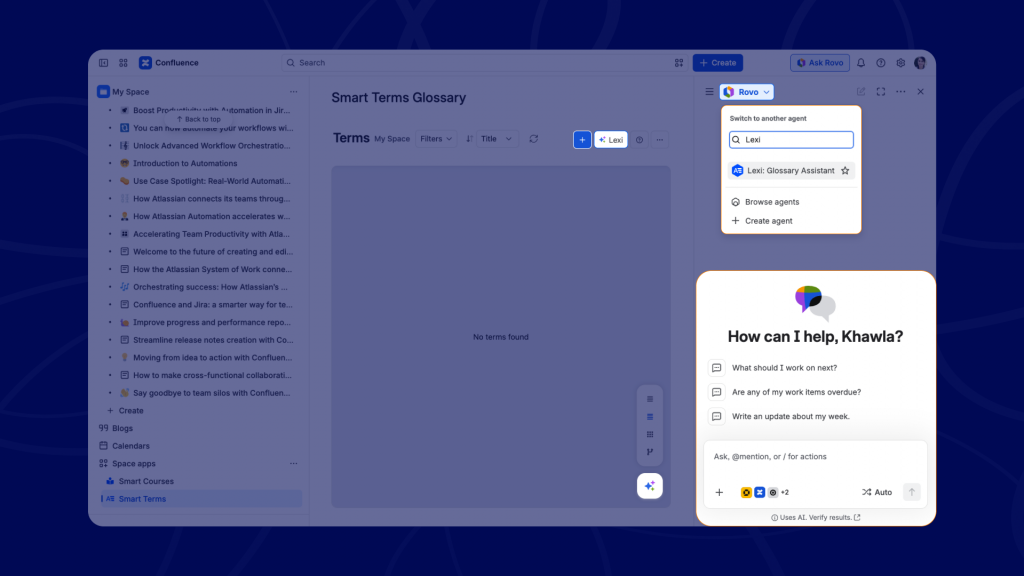
Instead of manually creating every glossary entry from scratch, teams can use AI to identify terminology, generate definitions, and build glossary content faster based on a space or page content. You can also upload a file, and Lexi will determine all the terms that should be defined.
The difference is that these definitions become managed assets rather than temporary AI responses.
Once created, terms can be edited, approved, enriched, translated, and governed like any other term created with Smart Terms.
Lexi helps create the glossary; Smart Terms advanced configuration helps manage it.
When to use Atlassian AI definitions and when to use Smart Terms Glossary?
Use Atlassian AI definitions when:
- Users need quick contextual explanations
- Information changes frequently
- You want immediate answers with minimal setup
- Understanding is more important than standardization
Use Smart Terms when:
- Definitions must be consistent across teams
- Terminology requires ownership and governance
- You need a central glossary repository
- Compliance and documentation accuracy matter
- You want rich definitions and structured relationships
- You need advanced highlighting and discoverability
- Multiple languages must be supported consistently
The strongest knowledge strategy combines both. AI helps people understand what they are reading, while a glossary ensures everyone is speaking the same language.
Final thoughts
AI has made knowledge more accessible than ever. But accessibility is not the same as consistency.
Features like AI definitions are excellent at helping employees understand unfamiliar concepts in context. They reduce friction and improve productivity.
Yet organizations still need a trusted source of truth for business terminology; that is where Smart Terms continues to deliver value, not because it competes with AI but because it provides the governance, structure, discoverability, and consistency that AI alone was never designed to provide.
And with Lexi bringing AI-powered glossary creation into Smart Terms, organizations no longer have to choose between intelligence and control.
ConfluenceDocumentationGlossaryKnowledge managementMultinational teams