Confluence employee training: A guide for L&D and training managers

Your company probably already has most of the content it needs for Confluence employee training. It’s in Confluence: product documentation, internal procedures, onboarding guides, policies, and knowledge-sharing pages.
But having this information available doesn’t necessarily mean Confluence employee training is effective for everyone.
For L&D and Training Managers, the challenge often isn’t creating more content. It’s turning existing knowledge into structured employee training that people can follow, complete, and understand.
The good news? If your organization already uses Confluence, you can leverage Confluence employee training instead of starting from scratch.
TL; DR
A Confluence knowledge base helps employees find information.
A training program guides them toward a defined objective, supporting Confluence employee training.
With Smart Courses for Confluence, you can turn the pages you already maintain into structured training.
It follows six steps.
Identify content, organize it into courses, and create Learning Paths.
Assign training to the right people, check understanding with quizzes, and track progress with Insights dashboards.
You don’t need to rebuild content in a separate platform.
Why Confluence employee training needs more than a knowledge base
A Confluence knowledge base is designed to make information accessible. Employees can search for answers, explore documentation, and collaborate on shared knowledge.
Training, however, requires a different approach.
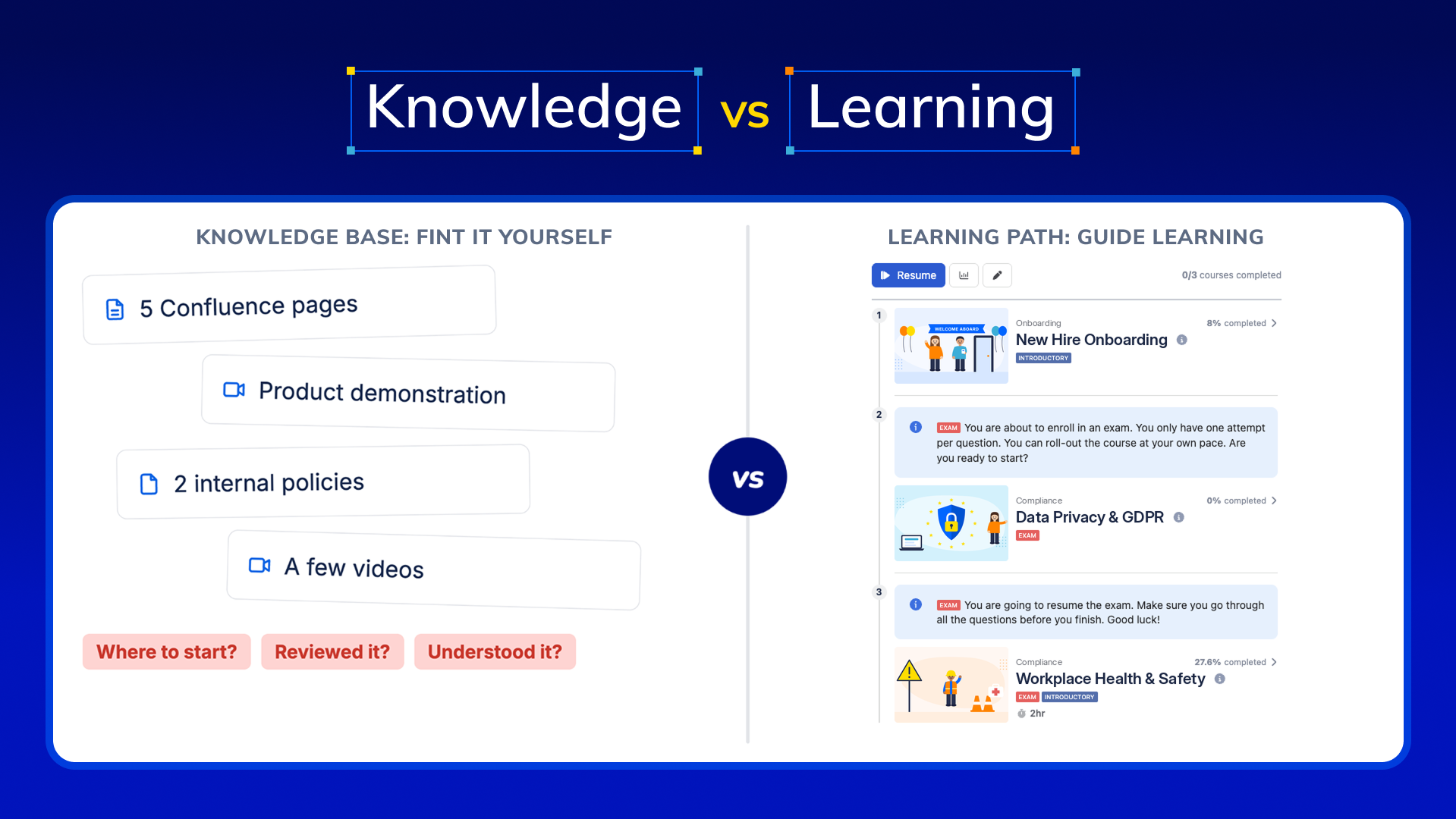
Imagine a new employee joining your company. You share five Confluence pages, a product demonstration, two internal policies, and a few videos.
Everything they need is technically there. But:
- Where should they start?
- Which materials should they complete first?
- How can you confirm they’ve reviewed the required content?
- How do you know whether they understood it?
- How can you monitor their progress?
This is where knowledge management and learning management differ.
A knowledge base helps employees find information when they need it. A learning program guides employees through specific content to achieve defined learning objectives.
For L&D teams, the opportunity is to connect both. The six steps below answer each of these questions, using the content you already have.
Step 1: Identify existing Confluence content for employee training
Before creating new training materials, review what’s already available.
Start with content that employees frequently need during onboarding, role-specific training, or ongoing professional development. For example:
| Existing Confluence content | Potential training use |
|---|---|
| Employee handbook | New hire orientation |
| Product documentation | Product knowledge training |
| Internal processes and SOPs | Operational training |
| Security and compliance policies | Mandatory awareness training |
| Customer support guidelines | Support team enablement |
The objective is to identify existing, maintained resources that can become part of a learning experience.
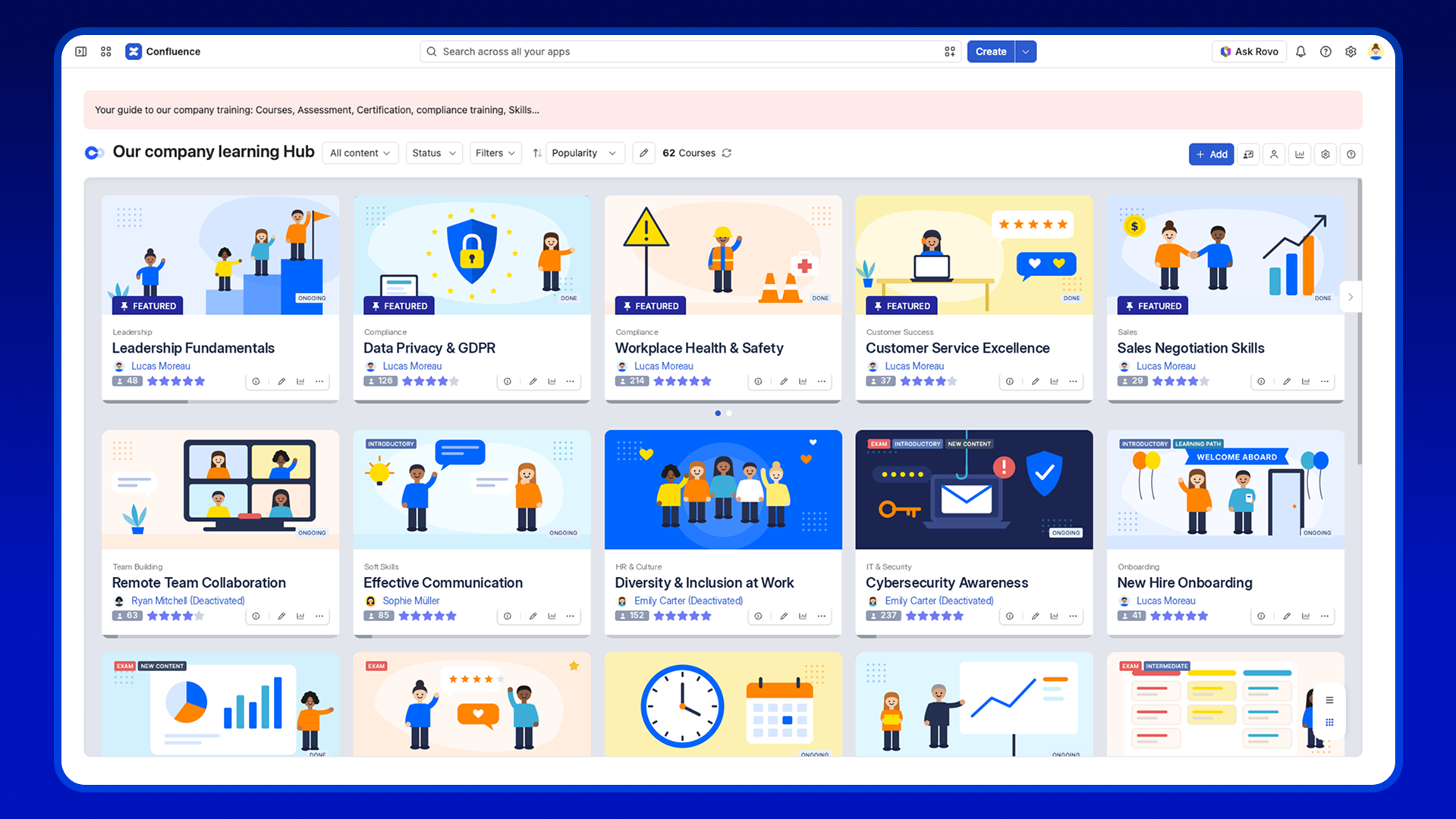
Step 2: Organize your content into a learning structure
Once you’ve selected your materials, organize them into a clear learning sequence.
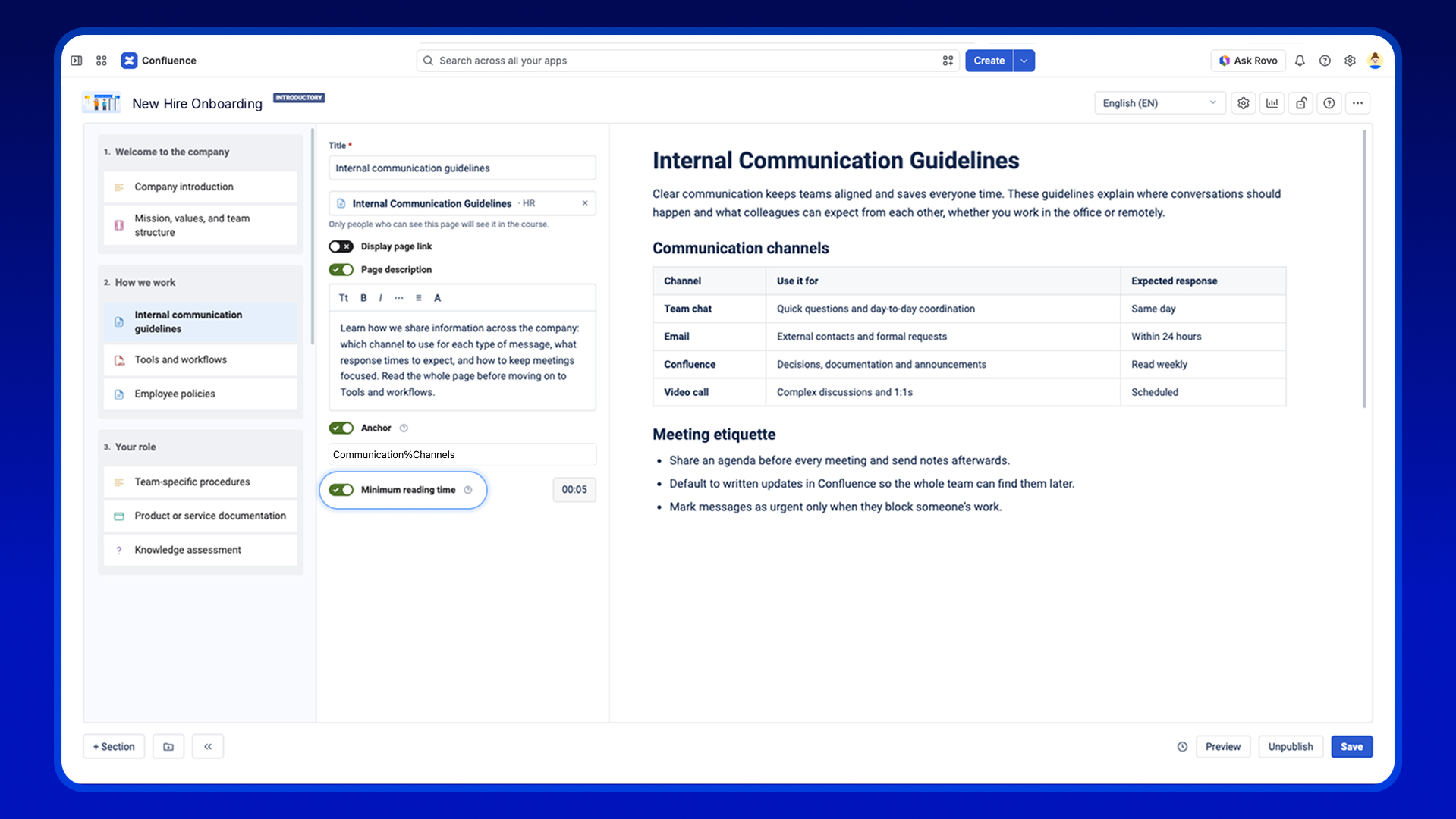
Rather than sharing a collection of unrelated links, group content into logical topics. For example, a new employee training course could include:
- Section 1: Welcome to the company
- Company introduction
- Mission, values, and team structure
- Section 2: How we work
- Internal communication guidelines
- Tools and workflows
- Employee policies
- Section 3: Your role
- Team-specific procedures
- Product or service documentation
- Knowledge assessment
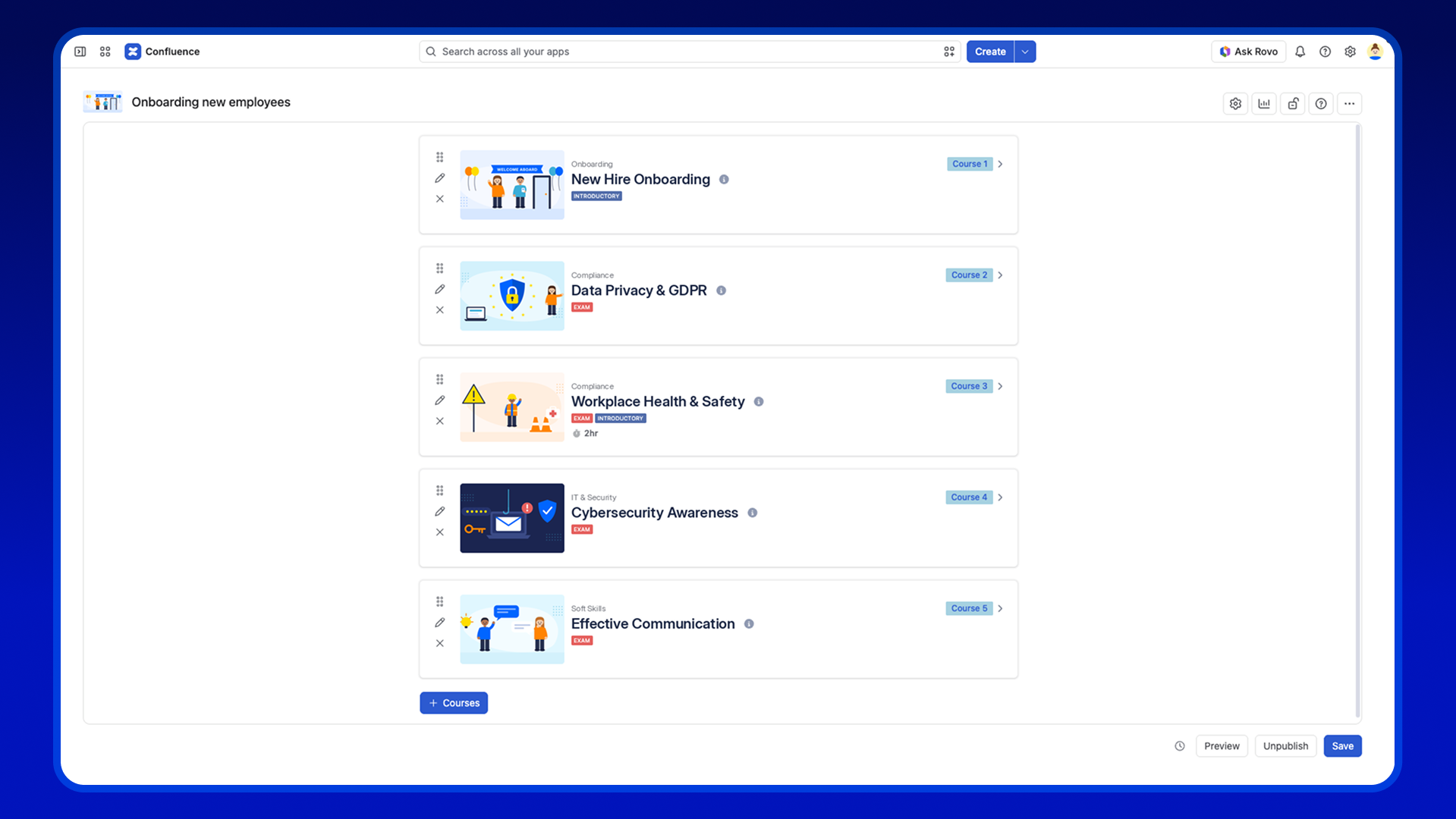
Alternatively, you can organize the same content into separate courses and bring them together in a Learning Path.
For example, a New Employee Onboarding Learning Path could include:
- Course 1: Welcome to the Company
- Company introduction
- Mission, values, and team structure
- Course 2: How We Work
- Internal communication guidelines
- Tools and workflows
- Employee policies
- Course 3: Your Role
- Team-specific procedures
- Product or service documentation
- Knowledge assessment
This structure gives learners a clear starting point and helps them understand what comes next.
With Smart Courses for Confluence, you can organize content into courses, sections, and individual learning components. You can include existing Confluence pages alongside videos, documents, text, and quizzes, instead of rebuilding your entire knowledge base inside a separate training platform. Your pages stay in Confluence, where your teams already maintain them.
To ensure learners review important content, you can set a minimum reading time on a component so they can’t skip ahead in seconds.
Step 3: Create learning paths
Not every learning objective can be covered in a single course.
New hires might need company orientation, security awareness, product knowledge, and role-specific training. Experienced employees might need advanced product training or periodic refresher courses.
This is where Learning Paths become useful. Instead of assigning each course separately, you can create a learning journey that brings related courses together. For example, a new employee Learning Path could include:
- Company introduction
- Internal tools and processes
- Security awareness
- Product knowledge
- Role-specific training
Smart Courses supports Learning Paths that combine multiple courses and exams, with optional linear progression.
This allows training managers to guide employees through the right material in an appropriate order, without requiring them to figure out what to learn next.
Step 4: Assign training to the right employees
Making training available is one thing. Ensuring the right employees receive it is another.
Some courses may be relevant to everyone, while others are required only for specific teams.
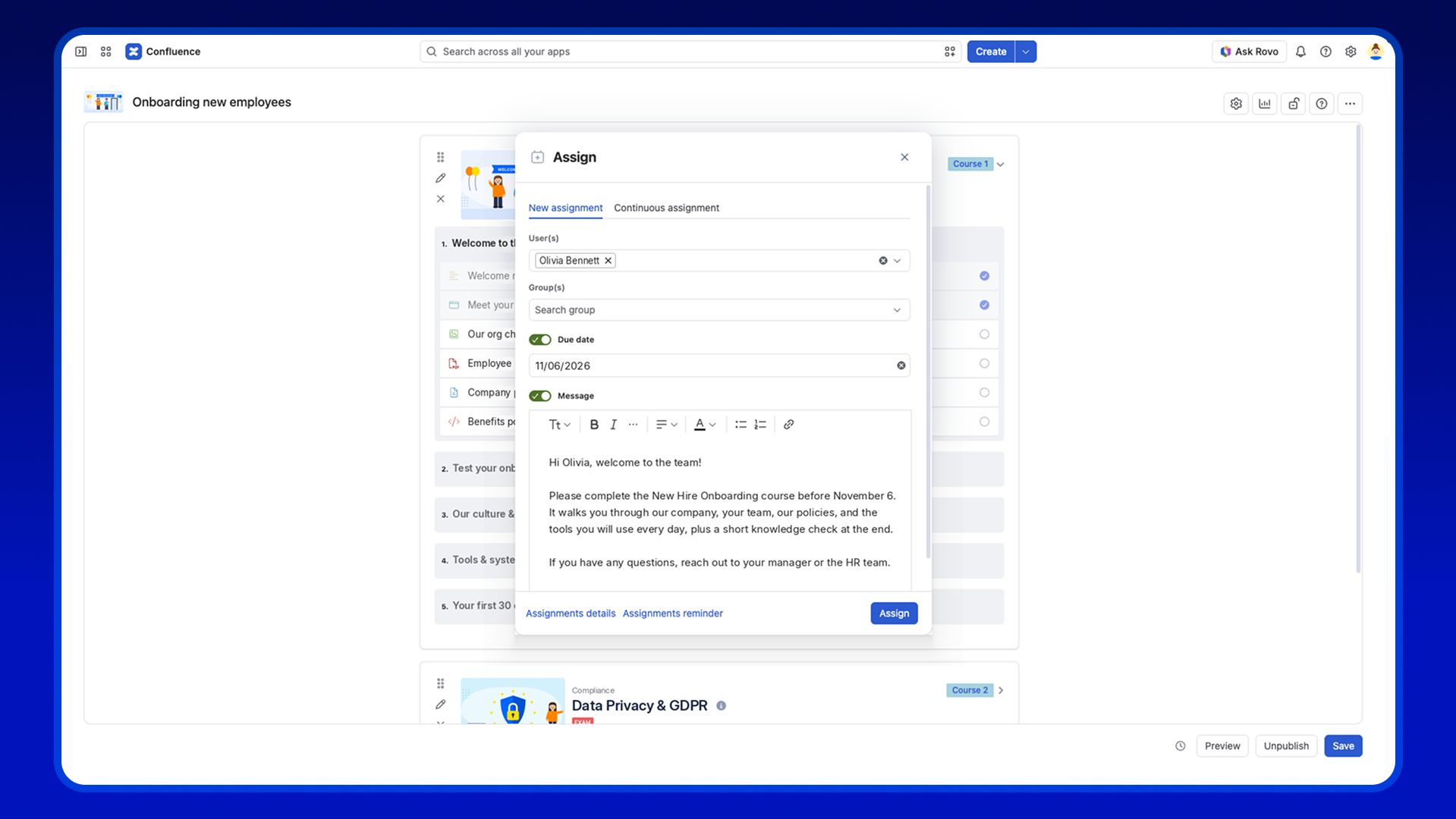
With Smart Courses, training managers can assign courses to individual users or groups, set due dates, add a message, and send reminders. For example:
- HR assigns onboarding training to new hires.
- IT assigns security awareness courses to relevant employees.
- Support managers assign product knowledge training to support teams.
- Department leads assign updated process training to their teams.
For recurring needs like onboarding, continuous assignments keep training assigned as your teams change, so new team members get the right courses without a manager setting it up each time.
This makes the training process easier to coordinate, especially as teams grow and training requirements become more diverse.
Step 5: Check understanding with quizzes and assessments
Opening a document doesn’t necessarily mean someone understood it.
For L&D teams, assessments help determine whether learners have understood important information and can apply what they’ve learned.
Smart Courses supports seven question types: single choice, multiple choices, freetext, matching, ordering, fill in the blank, and essay. This lets you test recall, reasoning, and written understanding within the same course.
For example, after completing a product knowledge section, employees could answer questions about common features, customer use cases, or troubleshooting procedures.
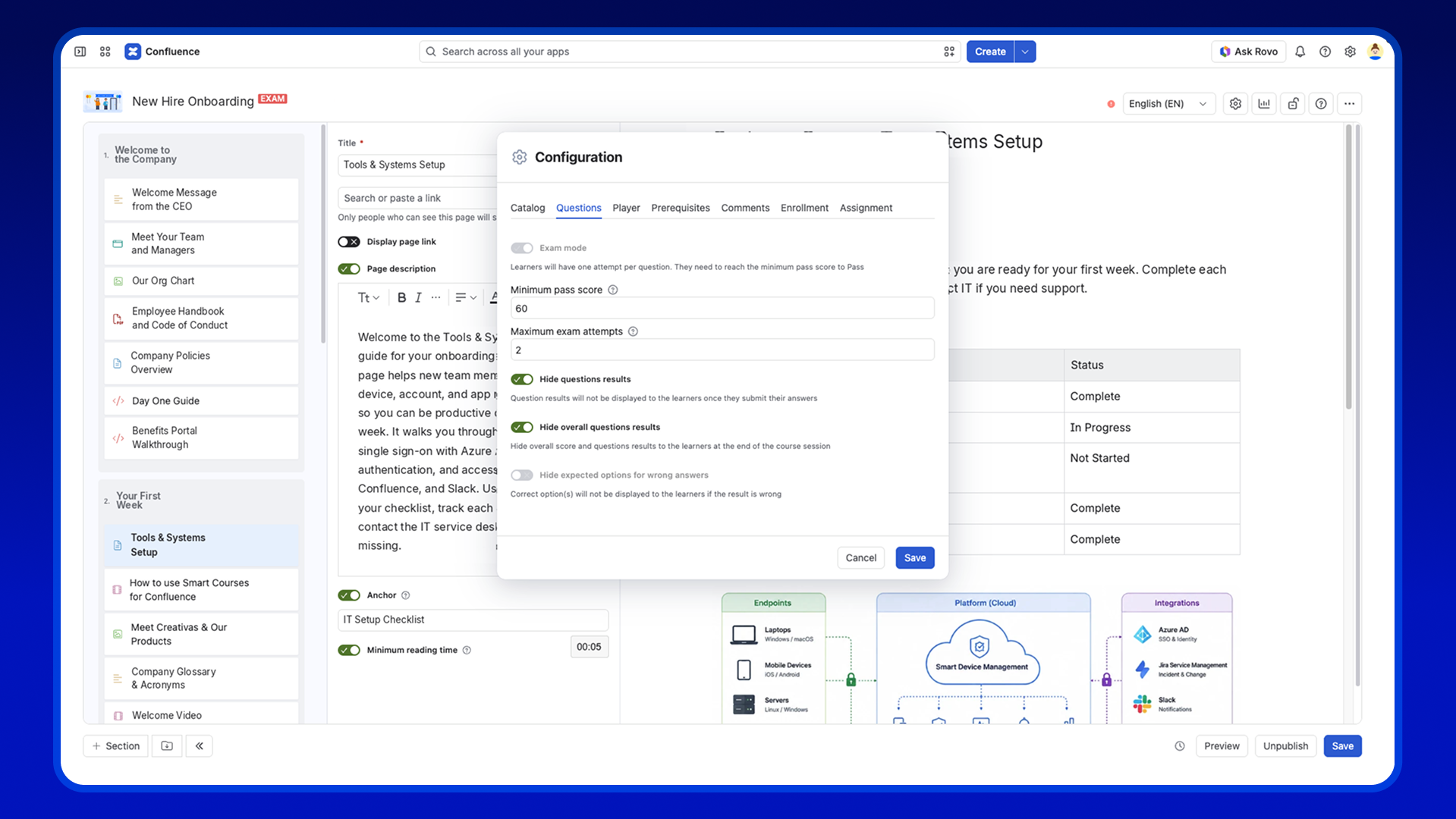
In exam mode, you can set a minimum pass score, limit the number of exam attempts, choose whether learners see their results, and issue certificates when learners meet the required completion criteria.
This connects training content with measurable learning outcomes rather than relying entirely on page views or self-reported completion.
Step 6: Track employee training progress
Once training is assigned, managers need visibility into participation and completion.
Without dedicated learning management functionality, this often involves manually following up with employees or maintaining separate tracking spreadsheets.
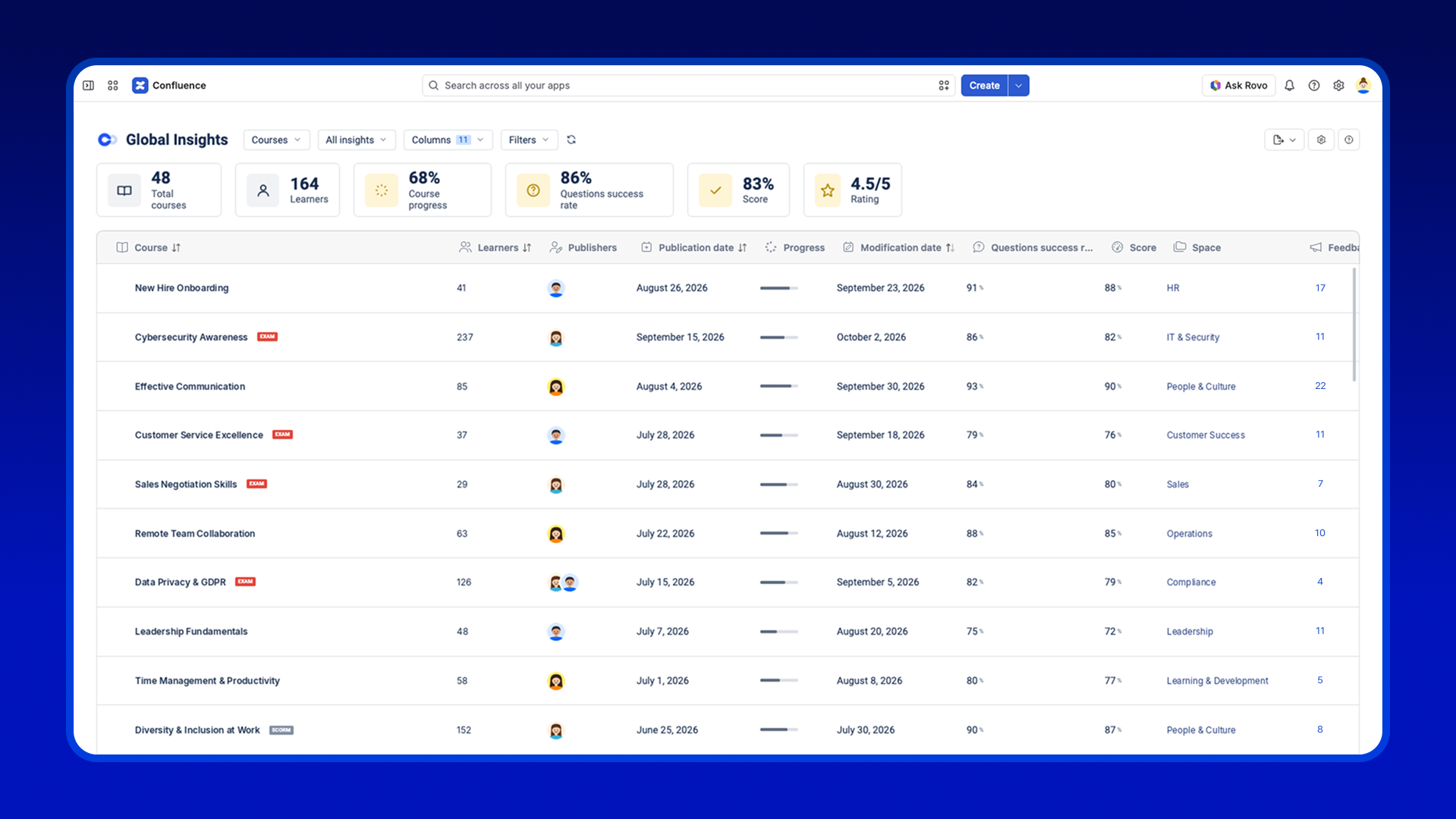
Smart Courses provides Insights dashboards that help training managers monitor learning activity and results. Depending on the dashboard, managers can review course completion, learner status, assessment results, and related training data. They can also export reports for further analysis.
This helps answer questions such as:
- Who has completed their assigned training?
- Which learners are still in progress?
- Who has overdue assignments?
- Which courses may require attention?
Instead of chasing updates across different channels, L&D teams have a clearer view of training progress.
How Atlassian’s Teamwork Collection fits into employee training
Structured learning works best when it stays connected to the knowledge and daily workflows employees already use.
Atlassian’s Teamwork Collection brings together Confluence, Jira, Loom, and Rovo to connect documentation, work, video communication, and knowledge discovery. Each can support a different part of employee learning:
- Confluence: Maintain the documentation, policies, and resources employees need to learn.
- Loom: Record walkthroughs and explanations that make complex procedures easier to follow.
- Jira: Connect learning-related tasks and follow-up activities to everyday workflows.
- Rovo: Help employees discover relevant knowledge and find answers across connected resources.
Smart Courses adds a dedicated learning layer within Confluence, letting organizations organize content into training programs, assign learning, assess understanding, and track progress.
Smart Courses runs inside Confluence, so your training is built directly on your Confluence content. Jira, Loom, and Rovo complement Smart Courses: they don’t integrate directly, but they strengthen the environment where you create, find, and put your training content into practice.
From knowledge sharing to employee learning
Your Confluence knowledge base is already an investment in your organization’s knowledge. Turning that information into structured training helps you get more value from it.
You can start with a single course, such as employee onboarding or product knowledge training, using content your team has already created. Then, as your learning needs grow, you can add assessments, assignments, Learning Paths, and progress tracking.
You don’t need to recreate your knowledge. You need a better way to help employees learn from it.
With Smart Courses for Confluence, you can build a learning experience around the knowledge your organization already maintains.
Try Smart Courses for Confluence on the Atlassian Marketplace or book a demo
FAQ
Can I use existing Confluence pages in a course?
Yes. Smart Courses lets you add existing Confluence pages to a course alongside videos, documents, text, and quizzes, so you don’t rebuild content in a separate platform.
What is the difference between a course and a Learning Path?
A course groups content into sections on one topic. A Learning Path combines several courses and exams into one journey, with optional linear progression.
What question types does Smart Courses support?
Seven: single choice, multiple choices, freetext, matching, ordering, fill in the blank, and essay.
Can I issue certificates in Confluence?
Yes. Smart Courses can issue certificates when learners meet the completion criteria, such as reaching the minimum pass score of an exam.
How do I track who completed their training?
Insights dashboards show course completion, learner status, and assessment results, and you can export reports for further analysis.
Can Confluence be used for employee training and learning management?
Yes. Confluence can serve as a central knowledge base for employee training. With Smart Courses for Confluence, you can turn existing documentation into structured courses, create Learning Paths, assign training to employees or groups, assess their understanding through quizzes and exams, issue certificates, and track learning progress through Insights dashboards.