How to automate onboarding with monday.com AI workflows and Smart Courses LMS?

Most onboarding processes don’t fail because of bad planning. They fail because everything depends on someone remembering to do the next step.

Today, that problem is even more visible. Teams are becoming leaner, expectations are higher, and new hires are expected to get up to speed faster than ever. There’s less room for delays, missed steps, or inconsistent training.
If you’ve ever managed onboarding, you’ve probably seen how easily things can slip. A task gets delayed, training isn’t assigned on time, or follow-ups depend on manual reminders. Even with a clear plan, execution becomes inconsistent.
That’s where monday.com starts to make a difference. It brings structure to onboarding by turning it into a workflow where every step is tracked, assigned, and visible. Instead of relying on memory, teams can rely on a system.
But even with that structure in place, onboarding still lacks the extra layer that makes it truly effective.
How does monday.com help you manage employee onboarding?
Onboarding tends to get messy faster than expected. Tasks are spread across emails, documents, and various tools, making it easy for things to fall through the cracks.
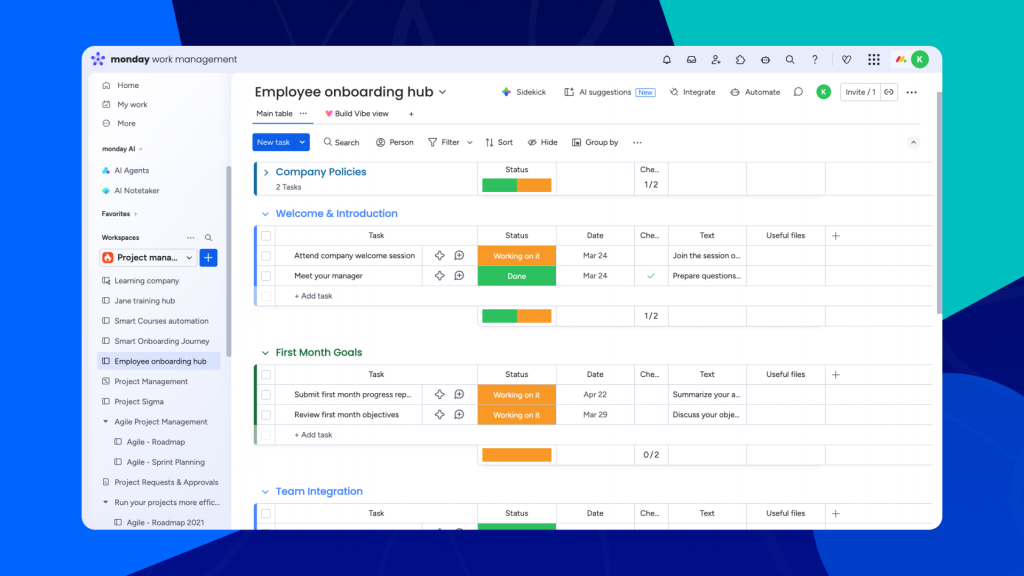
That’s exactly where it comes in. It gives you a way to organize onboarding into a clear workflow where every step is assigned, tracked, and visible. You can see who is responsible for what, what’s been completed, and what still needs attention, all in one place.
Why does onboarding need more than tasks and items?
Onboarding isn’t just about checking off tasks. It’s about helping new hires understand how things actually work.
They need to learn processes, tools, and expectations, which usually means going through structured learning modules. Without that, even a well-organized onboarding process can leave people confused or dependent on constant support.
The challenge is that while monday.com is great for managing workflows, it doesn’t natively deliver training or show how someone is progressing and performing through it. That’s why many teams end up using separate tools or manual tracking, which brings back the same problems onboarding was supposed to solve.
How does Smart Courses LMS fit into monday.com?
This is where Smart Courses makes a real difference. It adds that learning layer directly inside monday.com, so training becomes part of the same workflow rather than something separate.
What makes this especially powerful is that Smart Courses doesn’t introduce a new interface or external system. Instead, it uses the same board structure, navigation, and visual design that teams already use in monday.com. Everything feels familiar from the start, which means there’s no learning curve and no need to switch between tools.
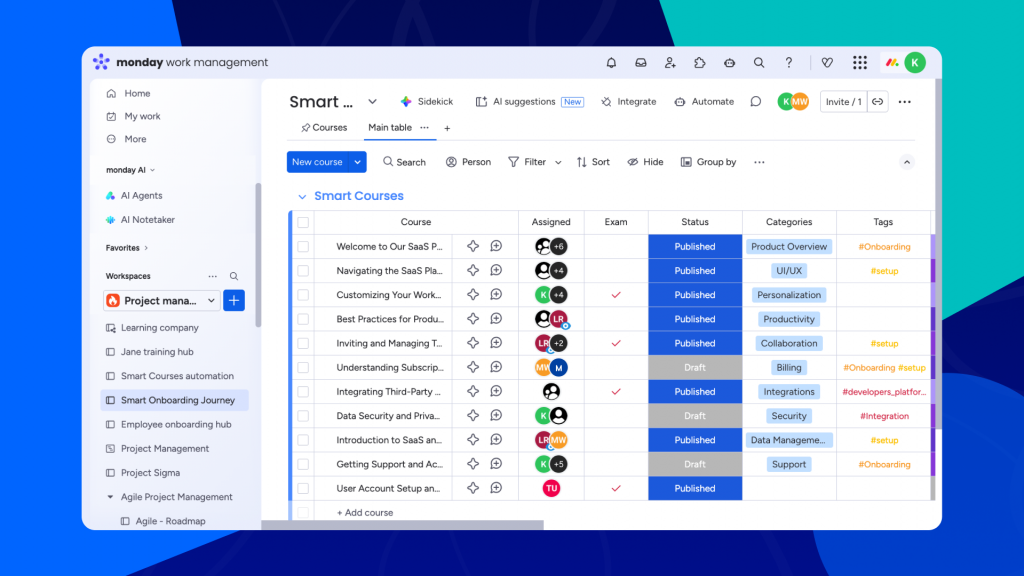
Because Smart Courses is built on top of the same board logic, you can use monday.com’s native capabilities directly within your training setup. This includes creating workflows, triggering automations, and leveraging AI automations to handle repetitive actions like assigning courses, updating statuses, or sending reminders.
Course creation follows the same intuitive approach as any other board in monday.com. You can build learning modules by combining different types of content, such as videos, documents, and assessments, and organizing them into structured sections that guide learners step by step. Everything lives within the item view, which serves as a dedicated training piece for each course.
As users go through their training, their activity is captured automatically. Instead of relying on manual tracking, teams can use course insights to see progress, completion, and performance directly within monday.com.
The result is a system where onboarding doesn’t just happen alongside your workflows, but inside them.
A simple onboarding flow using monday.com and Smart Courses
Let’s look at what onboarding actually looks like when everything is connected and automated.
It starts the moment a new employee is added. Instead of having someone manually assign training, the system immediately assigns the appropriate onboarding courses. The new hire doesn’t have to wait or ask what to do next, because everything is already in place from day one.
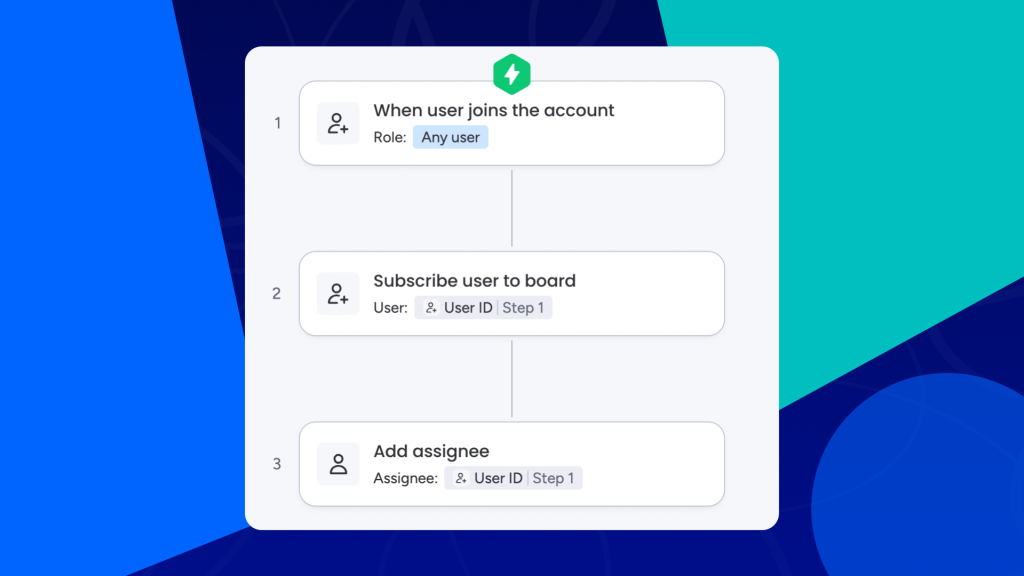
As they go through their training, course insights give visibility into their progress. You can quickly understand whether the onboarding is moving forward or if someone is falling behind, without needing to check in manually.
At the same time, onboarding content doesn’t stay static. When a course is updated and its status changes from draft to published, it is automatically assigned to the right users. This ensures that every new hire always receives the most up-to-date training without additional effort.
And because people get busy, reminders are sent automatically, and users will be notified. Instead of managers chasing employees, the system keeps things moving on its own.
Why are teams moving toward automated onboarding?
The shift toward automated onboarding isn’t only about scaling teams anymore. In many cases, teams are becoming leaner, and expectations from each new hire are higher than ever.
Companies are investing heavily in AI and automation, sometimes reducing headcount, but that makes onboarding even more critical. Every new employee needs to be productive faster and equipped with the right, up-to-date skills from day one.

This is where onboarding can no longer rely on manual processes. When training depends on follow-ups, scattered materials, or inconsistent delivery, it slows down time to productivity and creates gaps that teams can’t afford.
By combining monday.com workflows with Smart Courses and automations, onboarding becomes a system that ensures every hire receives the same structured training without additional effort. Instead of managing onboarding step by step, teams can rely on a process that runs consistently and adapts as content evolves.
In a context where companies are optimizing resources, investing in people remains one of the most important decisions. Automated onboarding ensures that investment is not only made, but fully realized.
OnboardingReportingTraining