How to deliver BAI Compliance training in Confluence?

Financial-services compliance training has two jobs: cover the right regulations for the right roles and make sure employees actually complete it.
Most organizations solve the first problem with specialized compliance courseware. But for teams already working in Confluence, training can still sit in a separate system from the policies, procedures, and documentation employees use every day.
Smart Courses lets you bring compatible, appropriately licensed BAI/ProSight compliance courseware into Confluence through SCORM, connecting specialized training with the workspace employees already use.
What is BAI compliance training?
BAI compliance training is now offered under the ProSight brand. BAI and the Risk Management Association (RMA) merged in 2024 to form ProSight Financial Association.
ProSight provides compliance courseware designed specifically for banks, credit unions, mortgage organizations, and other financial institutions.
Its training covers areas such as BSA and anti-money laundering, UDAAP, GLBA, cybersecurity, identity theft, lending regulations, deposit and transaction regulations, and corporate compliance.
Courses are built around financial-services roles and can include practical scenarios, interactive activities, and assessments. That specialized content is one reason organizations may prefer licensing established compliance training instead of recreating regulatory courses internally.
The challenge is not only the content
Good courseware solves the content problem. Employees still need an easy way to access and complete it.
For teams working across the Atlassian ecosystem, much of the supporting knowledge may already live in Confluence: internal policies, security procedures, risk-management documentation, department resources, and compliance guidance.
Putting training closer to that knowledge creates a clearer connection between the policy employees are expected to follow and the training they need to complete.
Instead of reading a policy in Confluence and then searching for the related course in another system, employees can access both from the same workspace.
Can BAI/ProSight courses run in another LMS?
Yes. ProSight licenses its programs for use in other learning management systems through its Content Provider Service, subject to the applicable agreement and approved LMS configuration.
Through its Content Provider Service, ProSight can provide licensed programs for use through a client’s approved learning management system.
An important distinction exists between ProSight/BAI-owned courseware and custom content your organization creates.
- ProSight/BAI courseware: You cannot assume you can freely export, copy, or reuse licensed ProSight/BAI training in another LMS. Whether you can deliver a course through an external LMS depends on your licensing agreement with ProSight and the delivery options they provide. Confirm the applicable permissions and SCORM availability with ProSight before requesting or importing course files.
- Custom content created by your organization: If you create and design your own training content within the platform, that content is separate from ProSight’s proprietary course catalog. Where the platform provides SCORM export for that custom content, you can export the resulting SCORM package and use it in a compatible LMS, subject to your organization’s rights to the content and the platform’s applicable terms.
In other words, licensed ProSight courseware and your own custom-created training should not be treated as having the same export rights.
Before planning the integration, confirm with ProSight that your agreement supports external-LMS delivery and that the course is available in a format compatible with SCORM 1.2 or SCORM 2004.
Once you have a compatible SCORM package that you are authorized to use in your LMS, Smart Courses can deliver it inside Confluence.
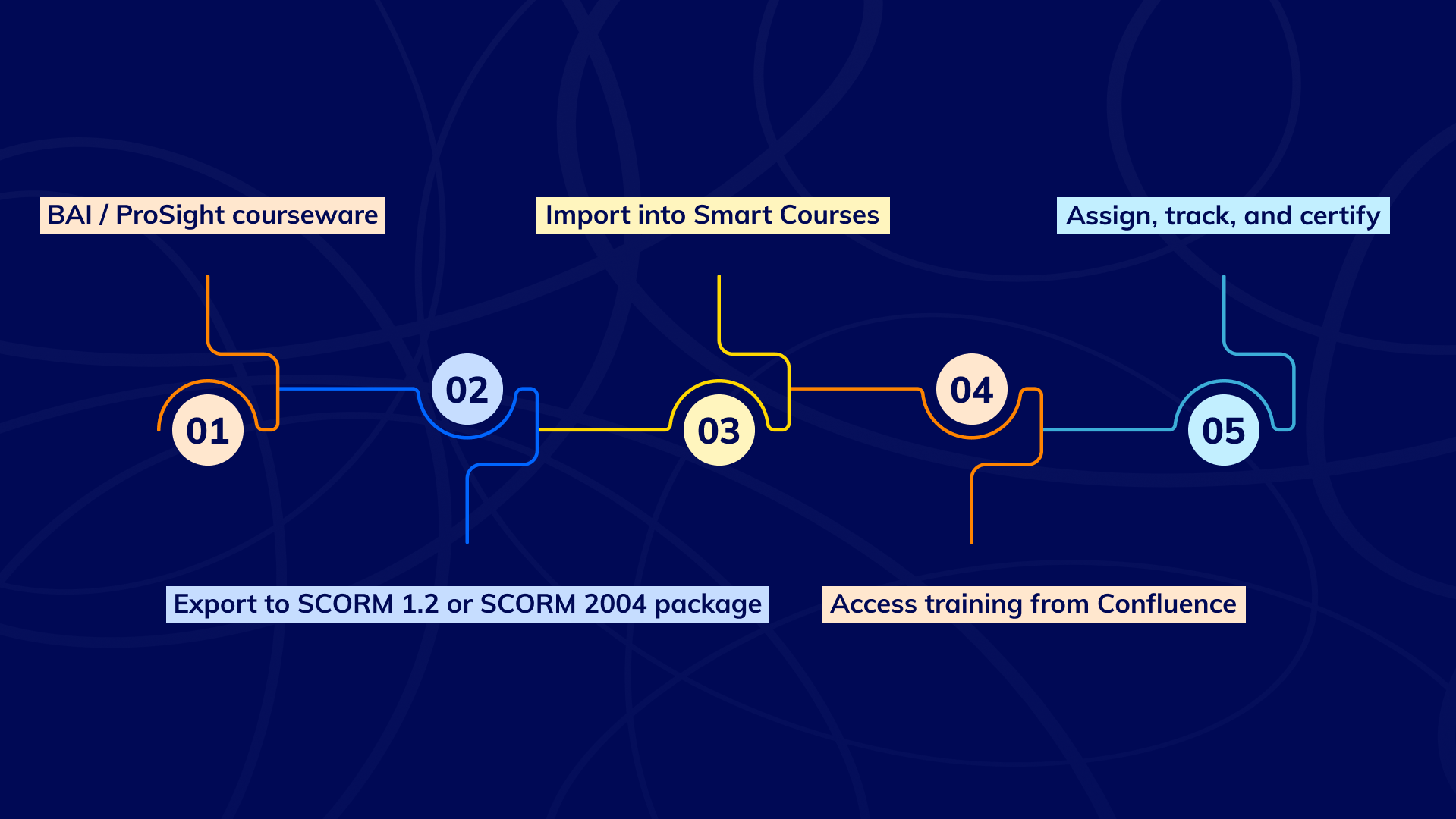
From ProSight courseware to training in Confluence
Start by selecting the ProSight courses that match your regulatory requirements and employee roles. Training for frontline employees, mortgage teams, managers, or compliance officers may differ, so match the right courseware to the right audience.
Once you select the courses, confirm with ProSight that your license and delivery arrangement support external-LMS use, and request the compatible course files or delivery method available for your account.
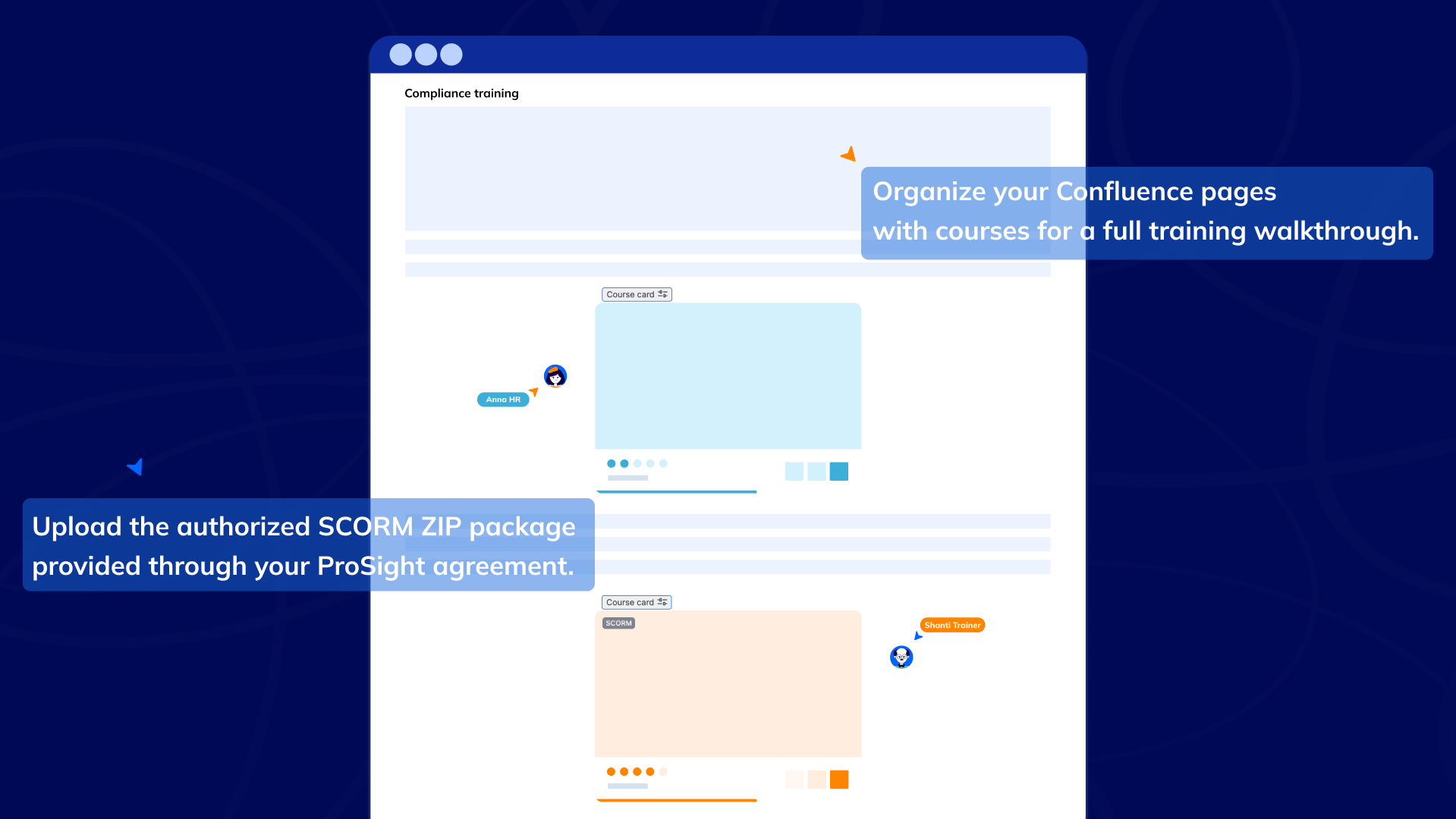
In Smart Courses, create a new course, enable the SCORM course option, open the course editor, and upload the compatible SCORM ZIP package you are authorized to use and have obtained through your ProSight licensing or delivery arrangement.
Smart Courses supports both SCORM 1.2 and SCORM 2004, so you can import compatible courseware without recreating the original training as Confluence pages.
Once published, you can assign the course to individual users or Confluence groups with a due date.
For recurring compliance requirements, group-based assignment can also help automate enrollment as employees join the relevant groups.
Administrators can then use Course Insights to follow learner progress, completion status, scores, and due dates.
Connect compliance training with your Confluence policies
This is where the combination becomes particularly useful.
Smart Courses provides a Course Card macro that can surface an individual published course on a Confluence page. The Course List macro can display a filtered collection of courses based on criteria such as categories, labels, or spaces.
Imagine an employee opening a Mandatory Banking Compliance Training page in Confluence.
At the top, the compliance team explains the program and provides links to internal policies. Below that, employees can find the relevant BSA/AML, cybersecurity, lending, identity-theft, or transaction-compliance courses available through Smart Courses.
The same page can also contain training deadlines, instructions, and contact information for the compliance team.
Employees move from policy → context → training without having to search across disconnected systems.
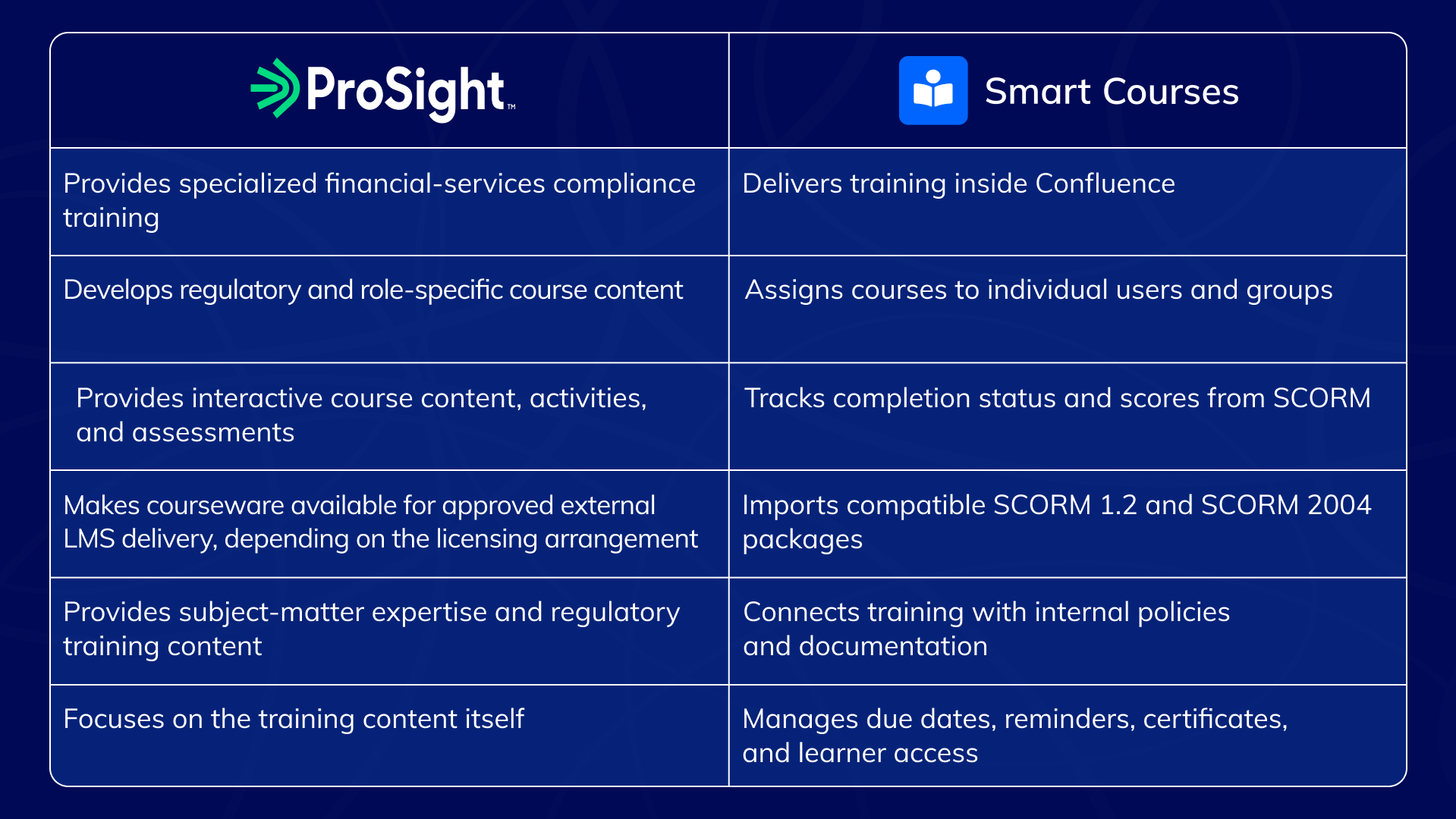
Who handles what?
A practical example
Consider a bank already managing its policies and procedures in Confluence.
The compliance team creates a Mandatory Banking Compliance Training page containing its internal compliance guidance and links to the policies employees are expected to understand.
Courses licensed from ProSight are imported into Smart Courses as SCORM packages and assigned by employee role.
Branch employees may receive BSA/AML and identity-theft training, while mortgage teams receive the lending-related courses relevant to their responsibilities.
Course cards and filtered course lists make that training accessible from the compliance area employees already use.
Meanwhile, the compliance team can use Insights to monitor who has completed the required training and where follow-up is still needed.
The result is a closer connection between what employees are expected to know and the training they are expected to complete.
What does Smart Courses track from SCORM?
Smart Courses captures the completion and score information sent by the SCORM package.
For SCORM 1.2, that includes lesson status and raw score. For SCORM 2004, Smart Courses uses completion status, success status, and raw score.
This allows learner results such as completed, incomplete, passed, or failed to appear in Smart Courses depending on the information provided by the package.
One limitation to keep in mind: Smart Courses does not currently capture individual question-level results from an imported SCORM course. It reports the package’s overall status and score.
Therefore, we recommend testing a new SCORM package before assigning it organization-wide to ensure its completion and scoring rules are reported as expected.
You can also enable certificates for SCORM courses when completion requirements are met.
Bring financial compliance training into Confluence
Compliance training works better when employees can easily find it alongside the policies and procedures it supports.
Once you have a compatible SCORM package that your ProSight licensing and delivery arrangement permits you to use in an LMS, upload it to Smart Courses, assign it to the right employees, and make it accessible from the Confluence pages your teams already use.
The compliance content stays specialized. The learning experience lives in Confluence.
Try Smart Courses for Confluence free for 30 days.
ConfluenceLearningOnboarding