Smart Courses for Confluence is now on Forge: What’s new

Moving Smart Courses to Atlassian Forge was not simply a matter of switching platforms. The app had to be rebuilt for Forge, and we knew one question mattered most to existing customers:
What happens to everything we’ve already built?
Your courses, assignments, learner data, Insights, and the workflows your teams already rely on all had to remain part of the experience.
The migration took several months of work, with one priority throughout: bring Smart Courses to Forge while preserving the features and workflows you are already familiar with.
But we didn’t stop at rebuilding what was already there.
Along the way, we also introduced improvements and new capabilities to make training easier to assign, track, and manage.
Smart Courses is now built on Atlassian Forge, with new capabilities to assign Learning Paths, understand learner status, and customize the information you see across course listings and Insights.
Let’s go through what’s new in this Cloud version of Smart Courses LMS.
Smart Courses is now on Atlassian Forge
Smart Courses for Confluence is now built on Atlassian Forge.
For most users, this change happens behind the scenes. The Smart Courses experience remains familiar, but the app is now built on the platform Atlassian is using for the future of its cloud ecosystem.
Why does this matter?
Moving to Forge keeps Smart Courses closely aligned with Atlassian’s platform and gives us a stronger foundation for future development.
As Confluence and the wider Atlassian ecosystem continue to evolve, Smart Courses can evolve alongside them, giving us more opportunities to introduce deeper integrations and new capabilities over time.
Most importantly, the move to Forge was designed around continuity. You can continue working with the training content and workflows you already know while benefiting from a version of Smart Courses built for Atlassian’s latest cloud platform.
Assign Learning Paths
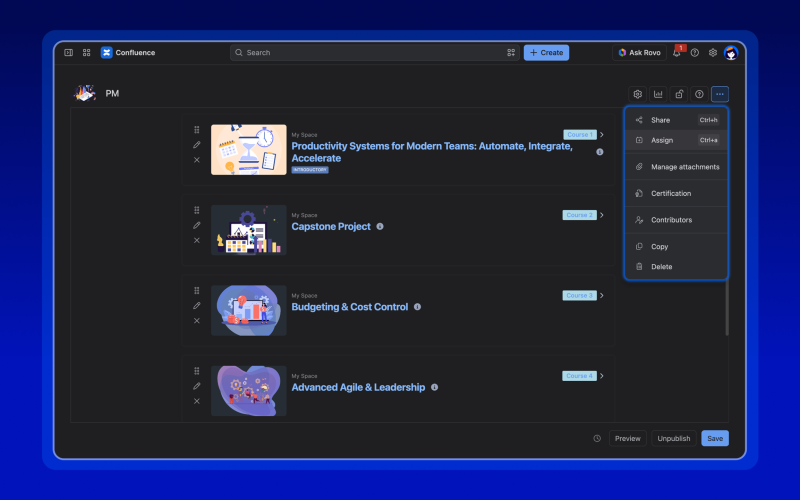
Learning Paths already let you combine up to 10 courses and exams into one structured learning journey.
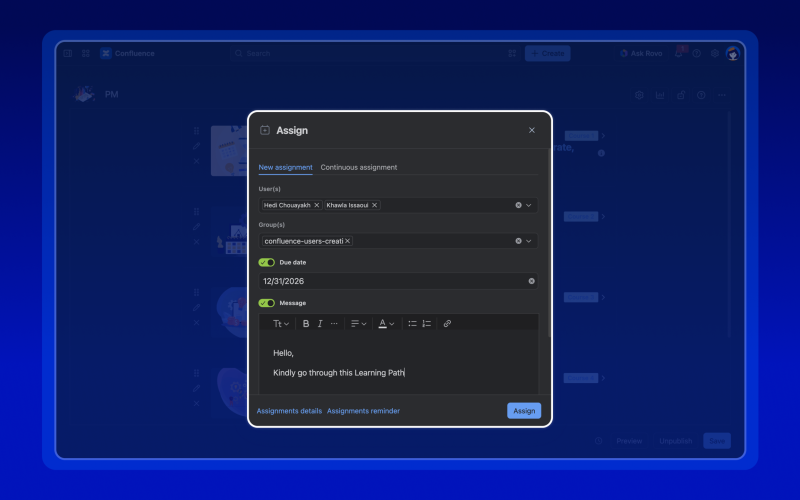
Now, you can assign an entire Learning Path to Confluence users and groups.
Instead of managing training course by course, you can assign the complete journey learners are expected to follow.
This can be especially useful for structured programs such as employee onboarding, compliance training, role-based training, or professional development.
Why did we add it?
This was actually one of the first feature requests we received after launching Learning Paths.
Creating a Learning Path makes it easier to organize related training, but customers also needed a simple way to assign that complete path to learners.
Now, instead of assigning each course separately or asking learners to find the right Learning Path themselves, you can assign the full path from the start.
See learner status directly in Course Insights
Course Insights help you understand how learners are progressing.
This release makes that information easier to scan by adding learner status directly to Course Insights.
You can now quickly see where each learner stands without relying only on progress percentages, completion dates, or other indicators.
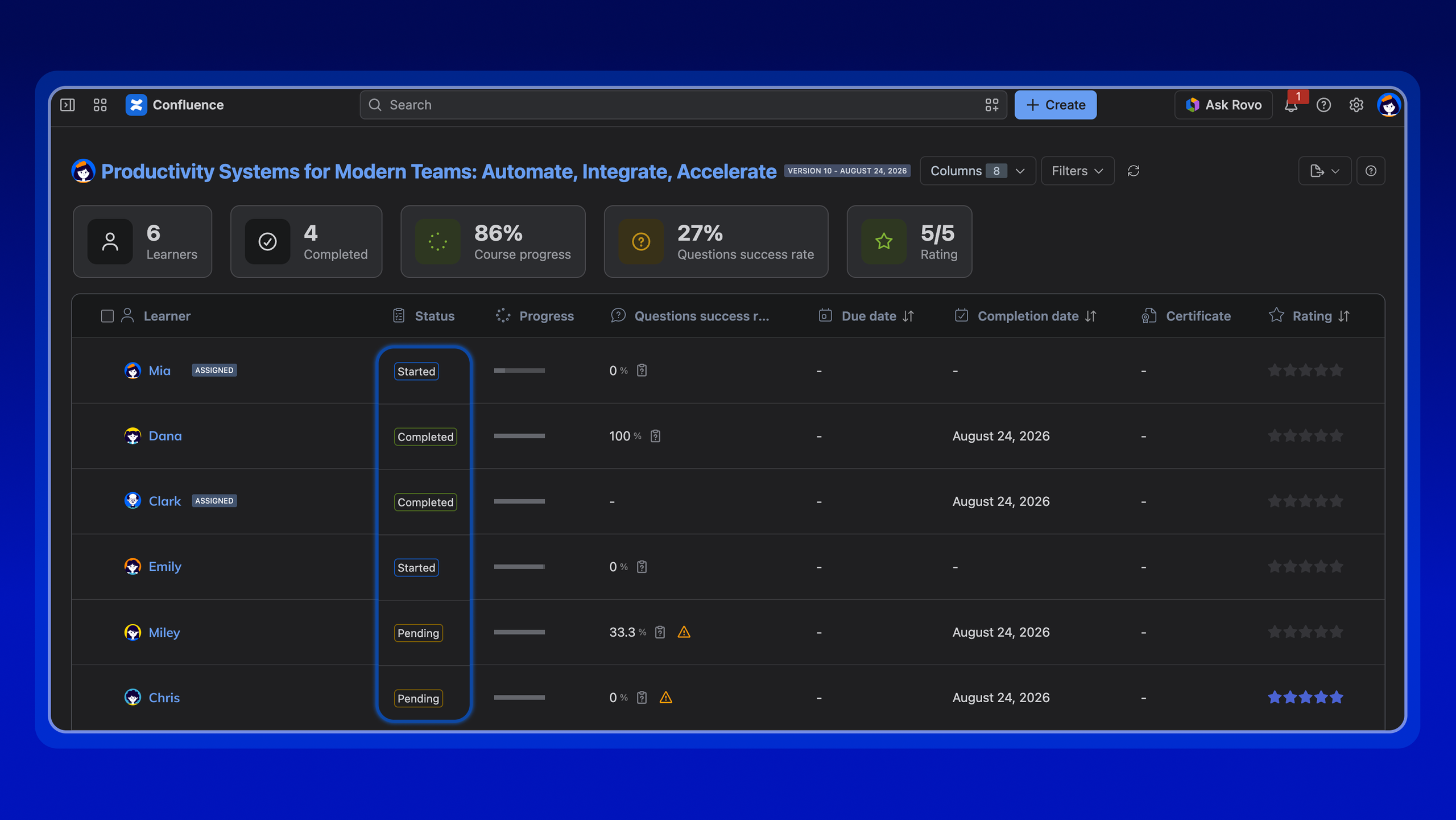
Why does this matter?
Checking individual learner progress may be manageable with a small group. As the number of learners grows, it becomes much harder.
Having a clear status directly in the Course Insights makes it easier to identify who has completed their training, who is still progressing, and who may require follow-up.
Instead of interpreting several pieces of data, you get a faster overview of where everyone stands.
Customize your lists
Not every team needs to see the same information.
An HR manager tracking onboarding may care about different data than someone managing compliance training, internal certification, or another training program.
You can now choose which columns to display and then drag and drop them into the order that works for you.
Column customization is available in both the course catalog Listing view and Insights dashboards.
Why did we add it?
As more information becomes available in Smart Courses, listings and Insights can quickly include columns that are useful for one workflow but less relevant to another.
Now, you can adapt the view to what you are working on.
Keep the information you use most visible, hide columns you don’t need, and drag and drop columns to arrange them in the order that makes the most sense for your team.
External Links
There is one more change to be aware of if your courses use externally hosted content.
With the new Forge version, media, embedded websites, and SCORM content that load resources from external domains are subject to Forge egress controls.
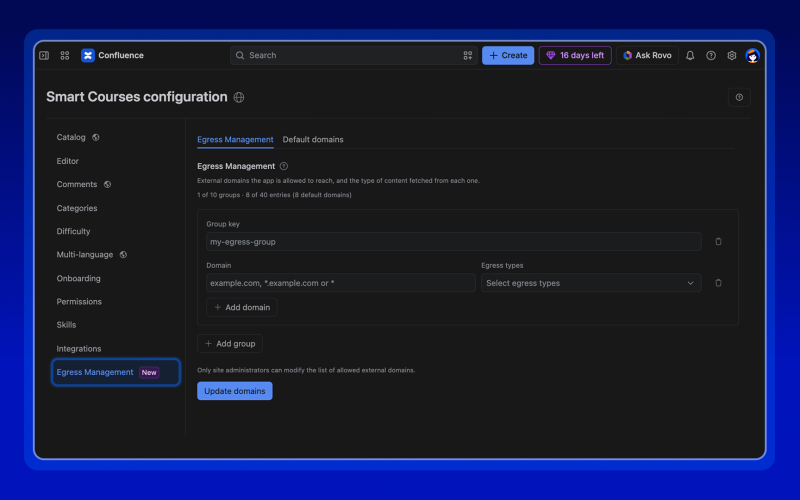
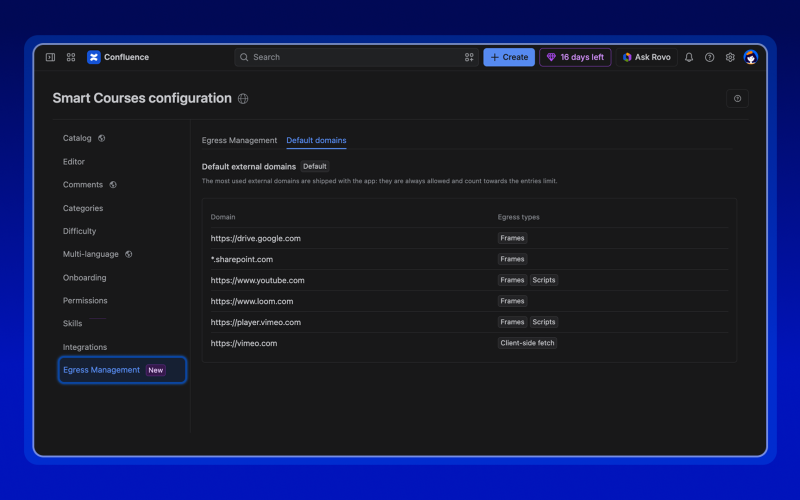
In simple terms, Smart Courses can load content only from approved external domains.
We’ve already included some of the external links commonly used by Smart Courses customers, so media components using these services can continue to work without additional configuration:
- Google Drive
- SharePoint
- YouTube
- Loom
- Vimeo
If your media (video or audio) comes from one of these supported sources, you usually don’t need to do anything.
What if your content comes from another website?
You have two options, depending on the type of content you are using.
Option 1: Upload the file as an attachment
For media such as images, videos, or audio files, you can export the file and upload it directly to Smart Courses as an attachment.
Option 2: Add the external domain in Smart Courses configuration
If the content must remain externally hosted, a Smart Courses admin or Confluence admin with site administration permissions can add the required domain in the Smart Courses global configuration.
Once the domain is added, Smart Courses can load supported content from that external source directly inside the course.
This applies to externally hosted:
- Video and audio components
- HTML and web page components
- SCORM packages that load content or resources from external links
More improvements in this release
Alongside the bigger updates, we’ve made a few more improvements to Smart Courses:
- Cleaner filters: A new filter UI in both the course catalog and Insights keeps the interface less cluttered while making it easier to find what you need.
- Easy access to copied courses: When you copy a course, you can now retrieve the link to the new course directly from the confirmation modal.
- Refreshed design: Smart Courses has been updated to better align with Atlassian’s latest design system, creating a more consistent experience across Confluence.
Try Smart Courses for Confluence free
ConfluenceLearningOnboarding